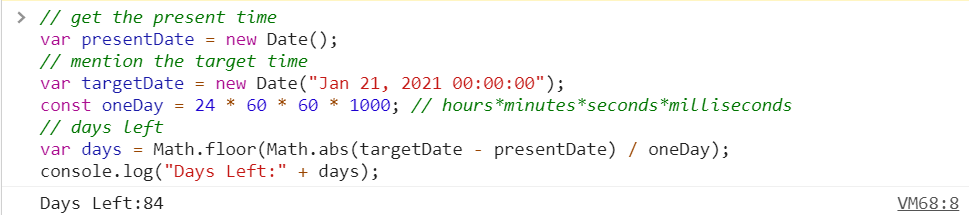
This script is used to find the number of days left for a particular date.
For example if the target date is 21st Jan 2021 and the present date is 28th Oct 2020, the output will show 84 days left.
- Open your browser and go to the required webpage.
- Launch Developer Tools in your Chrome browser
Go to your Chrome , and under the Developer Tools. For Windows / Mac , you can press F12 function key. Alternatively the short cut keys for Windows is “Control + Alt + I”, for Mac it is “Option + Command + I”. If you prefer to use the mouse instead, point to the hamburger menu (the 3 dots) on the Chrome top right corner. Click on it and the Developer Tools is in here

- Open console as shown below.

- Open the script and change the target date to the required date.
- Now copy the whole code and paste it into the console section and wait for the script to do its job !!!