
Apr-04-2019, 01:55 PM
I work on about developing a Qt GUI using Qt5 and PyQt.
I am trying to implement a display screen to Raspberry Pi that will dynamically "live update" the result to represent the rate at which the data is being transmitted in a (data/sec format). Data will be taken from URL WebPage (TCP/IP). This screen should cleanly live update. Any suggestions would be greatly appreciated. I want this to be built in as a widget within the GUI.
Detail:Data is distance measurement from ultrasonic sensor.
If distance change, GUI should show the twinkling of an eye.
Code output now:
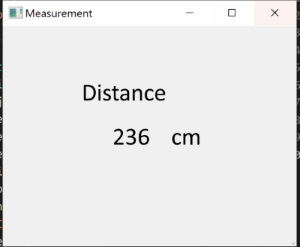
I am trying to implement a display screen to Raspberry Pi that will dynamically "live update" the result to represent the rate at which the data is being transmitted in a (data/sec format). Data will be taken from URL WebPage (TCP/IP). This screen should cleanly live update. Any suggestions would be greatly appreciated. I want this to be built in as a widget within the GUI.
Detail:Data is distance measurement from ultrasonic sensor.
from PyQt5 import QtCore, QtGui, QtWidgets
import socket
HOST = '192.168.1.33'  # The server's hostname or IP address
PORT = 80              # The port used by the server

with socket.socket(socket.AF_INET, socket.SOCK_STREAM) as s:
    s.connect((HOST, PORT))
    s.sendall(b'Hello, world')
    data = s.recv(1024)

class Ui_MainWindow(object):
    def setupUi(self, MainWindow):
        MainWindow.setObjectName("MainWindow")
        MainWindow.resize(800, 600)  #pencere boyutu
        self.centralwidget = QtWidgets.QWidget(MainWindow)
        self.centralwidget.setObjectName("centralwidget")
        self.label = QtWidgets.QLabel(self.centralwidget)
        self.label.setGeometry(QtCore.QRect(30, 30, 600, 300))
        font = QtGui.QFont()
        font.setFamily("Calibri")
        font.setPointSize(20)
        self.label.setFont(font)
        self.label.setAlignment(QtCore.Qt.AlignCenter)
        self.label.setObjectName("label")
        self.labelDistance = QtWidgets.QLabel(self.centralwidget)
        self.labelDistance.setGeometry(QtCore.QRect(150, 150, 400, 300))
        font = QtGui.QFont()
        font.setFamily("Calibri")
        font.setPointSize(20)
        self.labelDistance.setFont(font)
        self.labelDistance.setAlignment(QtCore.Qt.AlignCenter)
        self.labelDistance.setObjectName("labelDistance")
        self.labelcm = QtWidgets.QLabel(self.centralwidget)
        self.labelcm.setGeometry(QtCore.QRect(150, 150, 700, 300))
        font = QtGui.QFont()
        font.setFamily("Calibri")
        font.setPointSize(20)
        self.labelcm.setFont(font)
        self.labelcm.setAlignment(QtCore.Qt.AlignCenter)
        self.labelcm.setObjectName("labelcm")
        MainWindow.setCentralWidget(self.centralwidget)
        self.menubar = QtWidgets.QMenuBar(MainWindow)
        self.menubar.setGeometry(QtCore.QRect(0, 0, 259, 21))
        self.menubar.setObjectName("menubar")
        MainWindow.setMenuBar(self.menubar)
        self.statusbar = QtWidgets.QStatusBar(MainWindow)
        self.statusbar.setObjectName("statusbar")
        MainWindow.setStatusBar(self.statusbar)

        self.retranslateUi(MainWindow)
        QtCore.QMetaObject.connectSlotsByName(MainWindow)

    def retranslateUi(self, MainWindow):
        _translate = QtCore.QCoreApplication.translate
        MainWindow.setWindowTitle(_translate("MainWindow", "Measurement"))
        self.label.setText(_translate("MainWindow", "Distance"))
        self.labelDistance.setText(_translate("MainWindow", data))
        self.labelcm.setText(_translate("MainWindow", "cm"))

if __name__ == "__main__":
    import sys
    app = QtWidgets.QApplication(sys.argv)
    MainWindow = QtWidgets.QMainWindow()
    ui = Ui_MainWindow()
    ui.setupUi(MainWindow)
    MainWindow.show()
    sys.exit(app.exec_())
Data information is showing in row 57. But, this is not dynamic. In this code, I'm seeing constant value. When distance measurement on IP change, display widget should show new data result. On my program, you can next distance result, only when run python code again. My aim is that GUI should have refresh screen. How it is possible ? (I mean that it should be updating like a clock.)If distance change, GUI should show the twinkling of an eye.
Code output now: