Archive
pudb: a simple and intuitive debugger
Problem
You want to debug a Python source file. You have heard about pdb, but in the good old days you used Borland Pascal, Borland C, and you want something similar.
Solution
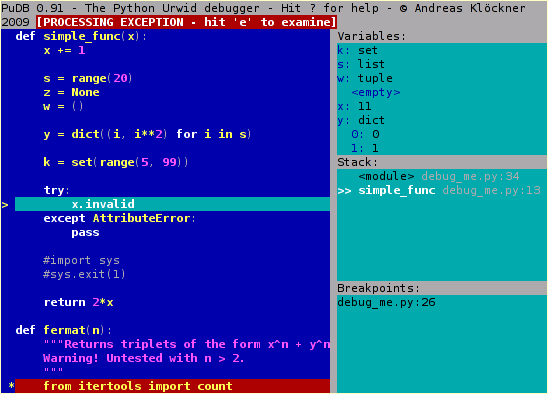
If you develop in the konsole, you must try pudb. “PuDB is a full-screen, console-based visual debugger for Python. Its goal is to provide all the niceties of modern GUI-based debuggers in a more lightweight and keyboard-friendly package. PuDB allows you to debug code right where you write and test it–in a terminal. If you’ve worked with the excellent (but nowadays ancient) DOS-based Turbo Pascal or C tools, PuDB’s UI might look familiar.” (source)
Links
- pudb HQ (@pypi)
- PuDB, a better Python debugger (Part 1)
- Hacking PuDB: Now an even better Python debugger (Part 2)
- Introduction to the PuDB Python Debugging Tool (by Prof. Norm Matloff )
For more alternatives, see this discussion about debugging (on reddit).
Usage tip
Add this line to your ~/.bashrc file:
alias pudb='python -m pudb'
Then you can start debugging with pudb like this:
$ pudb problem.py
Python keylogger
Imbox – Python IMAP for Humans
Imbox (https://github.com/martinrusev/imbox) is a “Python library for reading IMAP mailboxes and converting email content to machine readable data“.
Every message is an object with the following keys:
    message.sent_from
    message.sent_to
    message.subject
    message.headers
    message.message-id
    message.date
    message.body.plain
    message.body.html
    message.attachments
Remove suffix from the right side of a text
Problem
You have a string and you want to remove a substring from its right side. Your first idea is “rstrip“, but when you try it out, you get a strange result:
>>> "python.json".rstrip(".json")
'pyth'
Well, it’s not surprising if you know how “rstrip” works. Here the string “.json” is a set of characters, and these characters are removed from the right side of the original string. It goes from right to left: “n” is in the set, remove; remove “o“, remove “s“, remove “j“, remove “.“, then go on: “n” is in the set, remove; “o” is in the set, remove; “h” is not in the set, stop.
Solution
If you want to remove a suffix from a string, try this:
# tip from http://stackoverflow.com/questions/1038824
def strip_right(text, suffix):
    if not text.endswith(suffix):
        return text
    # else
    return text[:len(text)-len(suffix)]
Note that you cannot simply write “return text[:-len(suffix)]” because the suffix may be empty too.
How to remove a prefix:
def strip_left(text, prefix):
    if not text.startswith(prefix):
        return text
    # else
    return text[len(prefix):]
Usage:
>>> strip_right("python.json", ".json")
'python'

>>> strip_left("data/text/vmi.txt", "data/")
'text/vmi.txt'
Log in to comment
Dear Readers,
The spam filter on wordpress.com has not been very efficient recently. Too many spam messages get the “pending” status that I need to review manually. I can’t imagine why they aren’t flagged automatically as spam…
I got tired of these spam messages, thus from now on you must be logged in if you want to leave a comment. Thank you for your understanding. I hope you will still leave comments, I love receiving feedbacks.
Best wishes,
Jabba Laci
Generate random hash
Problem
MongoDB generates 96 bit hash values that are used as primary keys. In a project of mine I also needed randomly generated primary keys so I decided to go the MongoDB way. So the question is: how to generate 96 bit hash values with Python?
Solution
#!/usr/bin/env python

import random


def my_hash(bits=96):
    assert bits % 8 == 0
    required_length = bits / 8 * 2
    s = hex(random.getrandbits(bits)).lstrip('0x').rstrip('L')
    if len(s) < required_length:
        return my_hash(bits)
    else:
        return s


def main():
    for _ in range(3):
        print my_hash()

#########################################################

if __name__ == "__main__":
    main()
Sample output:
f4bf4a4c949d7beee38d84a3
457ef2f29f462a4f1e54b61e
dc921ad1e6c32bc8ce8503c8
Another (but about 3.5 times slower) solution:
def my_hash(bits=96):
    assert bits % 8 == 0
    return os.urandom(bits/8).encode('hex')
urandom needs the number of bytes as its parameter.
Tips from here.
Update (20130813)
I found a related work called SimpleFlake. SimpleFlake generates 64 bit IDs, where the ID is prefixed with a millisecond timestamp and the remaining bits are completely random. It has the advantage that IDs show the chronological order of ID creation.
A basic socket client server example
Here I present a basic socket client server example. It can be used as a starting point for a more serious project.
Problem
You want to have a server that is listening on a port. The server can receive data and these pieces of data must be processed one after the other. That is, the server must manage a queue and the received data are put in this queue. The elements in the queue must be processed one by one.
We also need a client whose job is to send data to the server.
(1) Common config part
# config.py
PORT=3030
The port number won’t be repeated in the server and in the client. Instead, it is read from a config file.
(2) The server
#!/usr/bin/env python
# server.py

import socket
import select
import config as cfg
import Queue
from threading import Thread
from time import sleep
from random import randint
import sys

class ProcessThread(Thread):
    def __init__(self):
        super(ProcessThread, self).__init__()
        self.running = True
        self.q = Queue.Queue()

    def add(self, data):
        self.q.put(data)

    def stop(self):
        self.running = False

    def run(self):
        q = self.q
        while self.running:
            try:
                # block for 1 second only:
                value = q.get(block=True, timeout=1)
                process(value)
            except Queue.Empty:
                sys.stdout.write('.')
                sys.stdout.flush()
        #
        if not q.empty():
            print "Elements left in the queue:"
            while not q.empty():
                print q.get()

t = ProcessThread()
t.start()

def process(value):
    """
    Implement this. Do something useful with the received data.
    """
    print value
    sleep(randint(1,9))    # emulating processing time

def main():
    s = socket.socket()         # Create a socket object
    host = socket.gethostname() # Get local machine name
    port = cfg.PORT                # Reserve a port for your service.
    s.bind((host, port))        # Bind to the port
    print "Listening on port {p}...".format(p=port)

    s.listen(5)                 # Now wait for client connection.
    while True:
        try:
            client, addr = s.accept()
            ready = select.select([client,],[], [],2)
            if ready[0]:
                data = client.recv(4096)
                #print data
                t.add(data)
        except KeyboardInterrupt:
            print
            print "Stop."
            break
        except socket.error, msg:
            print "Socket error! %s" % msg
            break
    #
    cleanup()

def cleanup():
    t.stop()
    t.join()

#########################################################

if __name__ == "__main__":
    main()
We create a thread that is running in the background and manages the queue. In a loop it checks if there is an element in the queue. If yes, then it takes out the first element and processes it.
In the main function we start listening on a given port. Incoming data are passed to the thread, where the thread puts it in the queue.
You can stop the server with CTRL+C. The cleanup method stops the thread nicely: it changes a variable to False, thus the thread quits from its infinite loop. Notice the parameters of q.get: we block for 1 second only. This way we have a chance to stop the thread even if the queue is empty. With t.join() we wait until it completely stops.
(3) The client
#!/usr/bin/env python
# client.py

import config as cfg
import sys
import socket

def main(elems):
    try:
        for e in elems:
            client = socket.socket(socket.AF_INET, socket.SOCK_STREAM)
            host = socket.gethostname()
            client.connect((host, cfg.PORT))
            client.send(e)
            client.shutdown(socket.SHUT_RDWR)
            client.close()
    except Exception as msg:
        print msg

#########################################################

if __name__ == "__main__":
    main(sys.argv[1:])
Command line parameters are passed one by one to the server to be processed.
Usage
Start the server in a terminal:
$ ./server.py
Listening on port 3030...
........
Start the client in another terminal and pass some values to the server:
$ ./client.py 1 5 8
Switch back to the server:
$ ./server.py
Listening on port 3030...
............1
5
8
....
Related links
- Queue class (synchronized)
- Python Network Programming (tutorial)
- Unix Socket Tutorial
- socket module in stdlib
- gramme (I wanted to use this first)
- wxPython: How to Communicate with Your GUI via sockets
[ discussion @reddit ]
Add History and Tab Completion to the Default Python Shell
Problem
You want history and TAB completion in your default Python shell. You are aware of bpython and ipython, but you miss this functionality in the default shell.
Solution
Edit ~/.bashrc:
# ~/.bashrc
export PYTHONSTARTUP=$HOME/.pythonstartup.py
Download pythonstartup.py from here and rename it to ~/.pythonstartup.py.
Signal processing (subscribe, emit, etc.)
If you had used a GUI framework like Qt, then you must have met signals. Signals provide an easy way to handle events in your program. For instance, when a button widget is created, you don’t need to code right there what should be executed when the button is clicked. Instead, the button emits the clicked signal and whatever callback is subscribed to that signal is executed to perform the desired action.
You can also add this functionality to simple scripts that have no GUI interfaces at all. Let’s see two solutions:
(1) blinker
“Blinker provides fast & simple object-to-object and broadcast signaling for Python objects.”
The Flask project too uses Blinker for signal processing.
Example #1:
from blinker import signal

>>> started = signal('round-started')
>>> def each(round):
...     print "Round %s!" % round
...
>>> started.connect(each)

>>> def round_two(round):
...     print "This is round two."
...
>>> started.connect(round_two, sender=2)

>>> for round in range(1, 4):
...     started.send(round)
...
# Round 1!
# Round 2!
# This is round two.
# Round 3!
How to read it? First, we create a global signal called “started“. The line “started.connect(each)” means: if the “started” signal is emitted (i.e. if this event happens), then call the “each” function.
Notice the “round” parameter of the “each” function: when a signal is emitted, it can transmit an object, i.e. at the place of signal emission you can send an arbitrary object with the signal.
The line “started.connect(round_two, sender=2)” means: if the “started” signal is emitted, then call the “round_two” function ONLY IF the object “2” is sent with the signal.
Then there is a loop from 1 to 3. In the loop we emit the “started” signal and the numbers are sent together with the signal. When the signal is emitted with “1“, “each” is called. When the signal is emitted with “2“, first “each” is called, then “round_two” is also executed since the signal holds the object “2” (the functions are called in the order of registration). Finally “each” is executed again with the number “3“.
Example #2 (taken from here):
class One:
    def __init__(self):
        self.two = Two()
        self.two.some_signal.connect(self.callback)

    def callback(self, data):    # notice the data parameter
        print 'Called'

class Two:
    some_signal = signal('some_signal')

    def process(self):
        # Do something
        self.some_signal.send()

one = One()
one.two.process()
“In code above, the Two object doesn’t even know if there’s some other object interested in its internal state changes. However, it does notify about them by emitting a signal that might be used by other objects (in this case a One object) to perform some specific action.” (by jcollado @SO)
(2) smokesignal
The project smokesignal is lighter than blinker.
Example #3:
from time import sleep
import smokesignal

@smokesignal.on('debug')
def verbose(val):
    print "#", val

# smokesignal.on('debug', verbose)
# smokesignal.on('debug', verbose, max_calls=5)    ## respond max. 5 times to the signal
# smokesignal.once('debug', verbose)    ## max_calls=1 this time

def main():
    for i in range(100):
        if i and i%10==0:
            smokesignal.emit('debug', i)
        sleep(.1)
It’s very similar to blinker. First we do the registration: if the “debug” signal is emitted, then execute the function “verbose“. In the loop if “i” is 10, 20, etc., then emit the signal “debug” and attach the value of “i” to the signal.
Smokesignal is just one file, thus it’s very easy to add to a project. However, it has a disadvantage:
“What would be great is if you could decorate instance methods… However, that doesn’t work because there is no knowledge of the class instance at the time the callback is registered to respond to signals.” (source)
They have a workaround but I find it ugly.
As seen in Example #2, with blinker you can register instance methods to be called when a signal is emitted.
Conclusion
If you want a lightweight solution without instance methods, use smokesignal. If you also want to call instance methods when an event happens, use blinker.

 Python Adventures
You must be logged in to post a comment.