Facing data with Chernoff faces

Introduction

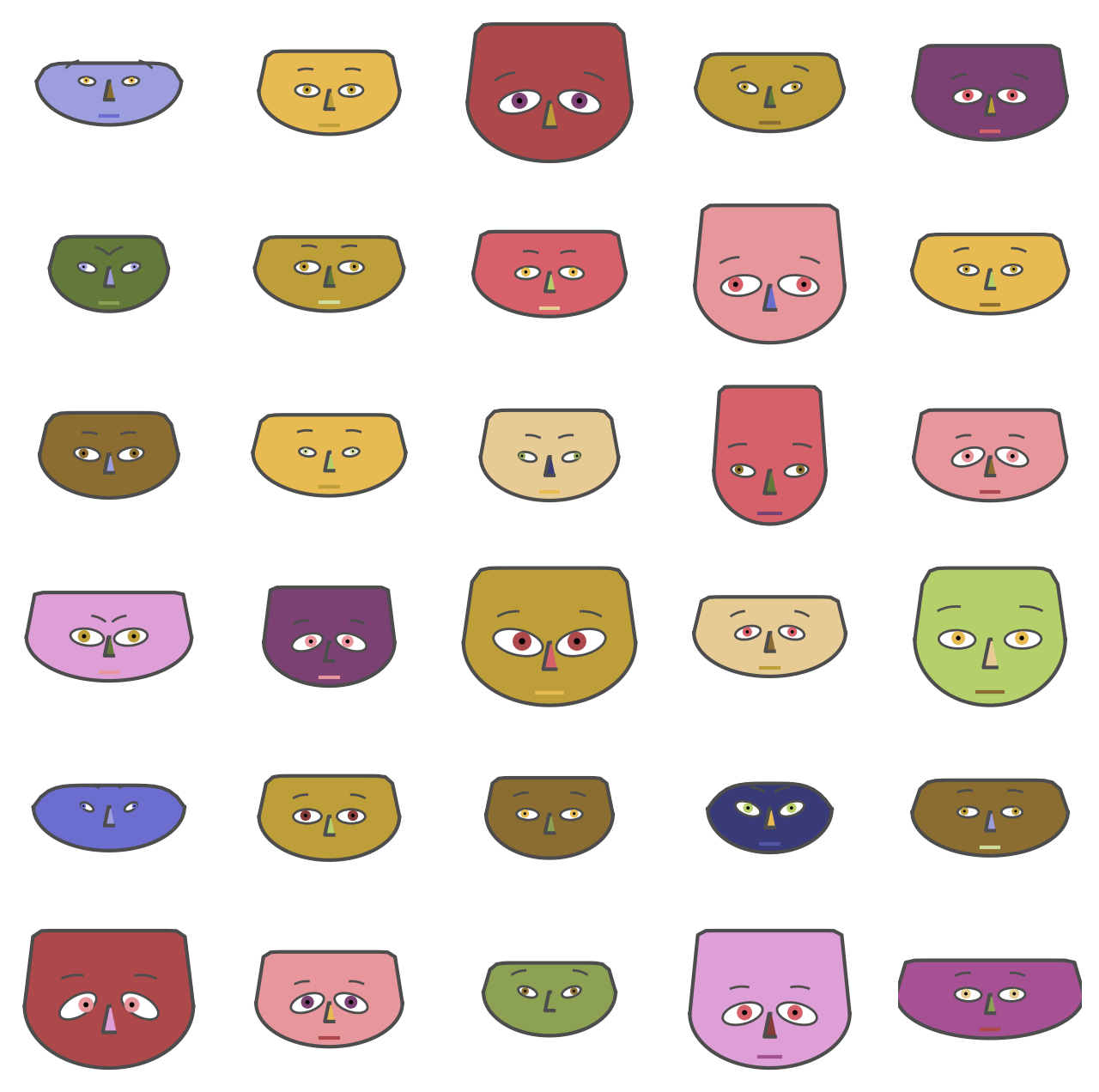
This blog post proclaims the Python package “ChernoffFace” and outlines and exemplifies its function chernoff_face that generates Chernoff diagrams.

The design, implementation strategy, and unit tests closely resemble the Wolfram Repository Function (WFR) ChernoffFace, [AAf1], and the original Mathematica package “ChernoffFaces.m”, [AAp1].


Installation

To install from GitHub use the shell command:

python -m pip install git+https://github.com/antononcube/Python-packages.git#egg=ChernoffFace\&subdirectory=ChernoffFace

To install from PyPI:

python -m pip install ChernoffFace


Usage examples

Setup

from ChernoffFace import *
import numpy
import matplotlib.cm

Random data

# Generate data
numpy.random.seed(32)
data = numpy.random.rand(16, 12)
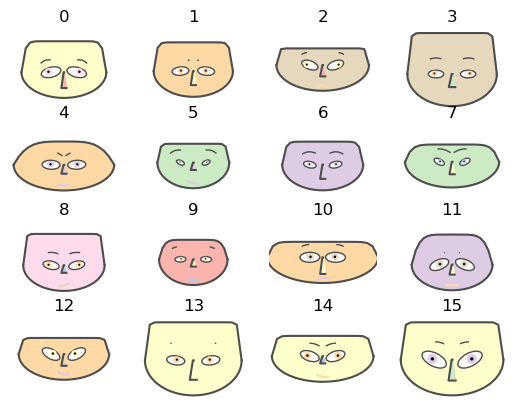
# Make Chernoff faces
fig = chernoff_face(data=data,
                    titles=[str(x) for x in list(range(len(data)))],
                    color_mapper=matplotlib.cm.Pastel1)
png

Employee attitude data

Get Employee attitude data

dfData=load_employee_attitude_data_frame()
dfData.head()
RatingComplaintsPrivilegesLearningRaisesCriticalAdvancement
043513039619245
163645154637347
271706869768648
361634547548435
481785666718347

Rescale the variables:

dfData2 = variables_rescale(dfData)
dfData2.head()
RatingComplaintsPrivilegesLearningRaisesCriticalAdvancement
00.0666670.2641510.0000000.1219510.4000001.0000000.425532
10.5111110.5094340.3962260.4878050.4444440.5581400.468085
20.6888890.6226420.7169810.8536590.7333330.8604650.489362
30.4666670.4905660.2830190.3170730.2444440.8139530.212766
40.9111110.7735850.4905660.7804880.6222220.7906980.468085

Make the corresponding Chernoff faces:

fig = chernoff_face(data=dfData2,
                    n_columns=5,
                    long_face=False,
                    color_mapper=matplotlib.cm.tab20b,
                    figsize=(8, 8), dpi=200)
png

USA arrests data

Get USA arrests data:

dfData=load_usa_arrests_data_frame()
dfData.head()
StateNameMurderAssaultUrbanPopulationRape
0Alabama13.22365821.2
1Alaska10.02634844.5
2Arizona8.12948031.0
3Arkansas8.81905019.5
4California9.02769140.6

Rescale the variables:

dfData2 = variables_rescale(dfData)
dfData2.head()
StateNameMurderAssaultUrbanPopulationRape
0Alabama0.7469880.6541100.4406780.359173
1Alaska0.5542170.7465750.2711860.961240
2Arizona0.4397590.8527400.8135590.612403
3Arkansas0.4819280.4965750.3050850.315245
4California0.4939760.7910961.0000000.860465

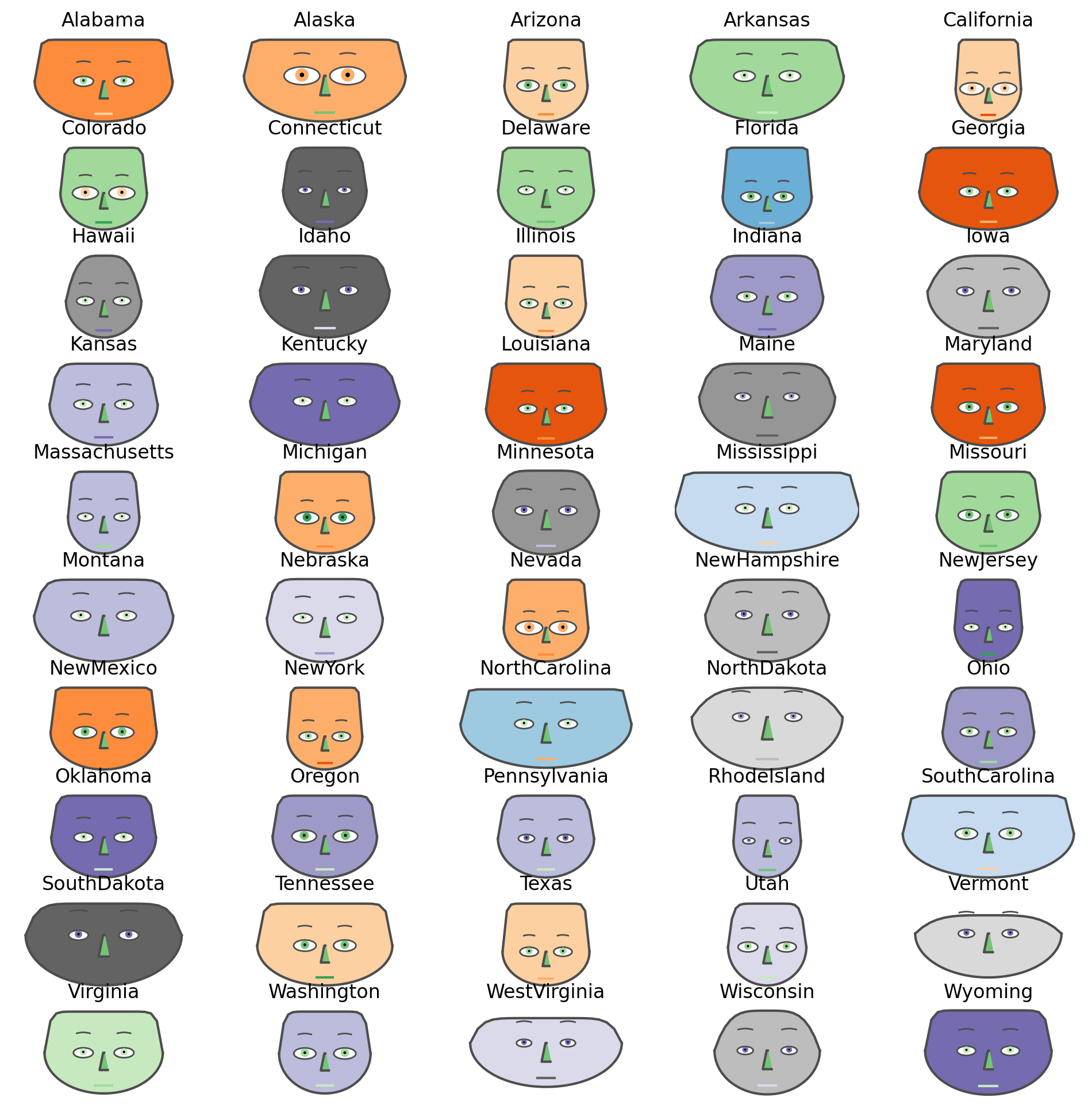
Make the corresponding Chernoff faces using USA state names as titles:

fig = chernoff_face(data=dfData2,
                    n_columns=5,
                    long_face=False,
                    color_mapper=matplotlib.cm.tab20c_r,
                    figsize=(12, 12), dpi=200)
png

References

Articles

[AA1] Anton Antonov, “Making Chernoff faces for data visualization”, (2016), MathematicaForPrediction at WordPress.

Functions and packages

[AAf1] Anton Antonov, ChernoffFace, (2019), Wolfram Function Repository.

[AAp1] Anton Antonov, Chernoff faces implementation in Mathematica, (2016), MathematicaForPrediction at GitHub.

Random Data Generators

Introduction

This blog post proclaims and briefly describes the Python package “RandomDataGenerators” that has functions for generating random strings, words, pet names, and (tabular) data frames.

The full list of features and development status can be found in the org-mode file Random-data-generators-work-plan.org.

Motivation

The primary motivation for this package is to have simple, intuitively named functions for generating random vectors (lists) and data frames of different objects.

Although, Python has support of random vector generation, it is assumed that commands like the following are easier to use:

random_string(6, chars = 4, pattern = "[\l\d]")


Installation

To install from GitHub use the shell command:

python -m pip install git+https://github.com/antononcube/Python-packages.git#egg=RandomDataGenerators\&subdirectory=RandomDataGenerators

To install from PyPi.org:

python -m pip install RandomDataGenerators


Setup

from RandomDataGenerators import *

The import command above is equivalent to the import commands:

from RandomDataGenerators.RandomDataFrameGenerator import random_data_frame
from RandomDataGenerators.RandomFunctions import random_string
from RandomDataGenerators.RandomFunctions import random_word
from RandomDataGenerators.RandomFunctions import random_pet_name
from RandomDataGenerators.RandomFunctions import random_pretentious_job_title

We are also going to use the packages randomnumpy, and pandas:

import random
import numpy
import pandas
pandas.set_option('display.max_columns', None)


Random strings

The function random_string generates random strings. (It is based on the package StringGenerator, \[PW1\].)

Here we generate a vector of random strings with length 4 and characters that belong to specified ranges:

random_string(6, chars=4, pattern = "[\d]") # digits only

## ['3749', '4572', '9812', '7395', '2388', '7625']

random_string(6, chars=4, pattern = "[\l]") # letters only

## ['FhSd', 'DNSu', 'YggC', 'ajqA', 'dIBt', 'Mjdc']

random_string(6, chars=4, pattern = "[\l\d]") # both digits and letters

## ['yp4u', '2Shk', 'pvpS', 'M43O', 'm5SX', 'It3L']


Random words

The function random_word generates random words.

Here we generate a list with 12 random words:

random_word(12)

## ['arteria', 'Sauria', 'mentation', 'elope', 'expositor', 'planetarium', 'agglutinin', 'Faunus', 'flab', 'slub', 'Chasidic', 'Jirrbal']

Here we generate a table of random words of different types (kinds):

dfWords = pandas.DataFrame({k: random_word(6, kind = k) for k in ["Any", "Common", "Known", "Stop"]})
print(dfWords.transpose().to_string())

##                0              1          2                 3            4              5
## Any     stuffing  mind-altering    angrily        Embothrium       sorbet        smoking
## Common    reason       mackerel  alignment        calculator     halfback      paranoiac
## Known     tannoy    double-date    deckled  gynandromorphous  gravitative  steganography
## Stop       about              N      noone              next         back          alone

Remark: None can be used instead of 'Any'.


Random pet names

The function random_pet_name generates random pet names.

The pet names are taken from publicly available data of pet license registrations in the years 2015–2020 in Seattle, WA, USA. See \[DG1\].

The following command generates a list of six random pet names:

random.seed(32)
random_pet_name(6)

## ['Oskar', 'Bilbo "Bobo" Waggins', 'Maximus', 'Gracie', 'Osa', 'Fabio']

The named argument species can be used to specify specie of the random pet names. (According to the specie-name relationships in \[DG1\].)

Here we generate a table of random pet names of different species:

dfPetNames = pandas.DataFrame({ wt: random_pet_name(6, species = wt) for wt in ["Any", "Cat", "Dog", "Goat", "Pig"] })
dfPetNames.transpose()

##             0                1         2        3          4         5
## Any     Lumen             Asha      Echo     Yuki    Francis   Charlie
## Cat     Ellie      Roxie Grace    Norman     Bean  Mr. Darcy  Hermione
## Dog   Brewski            Matzo      Joey    K. C.      Oscar    Gracie
## Goat     Lula  Brussels Sprout     Grace   Moppet     Frosty      Arya
## Pig    Millie         Guinness  Guinness  Atticus   Guinness    Millie

Remark: None can be used instead of 'Any'.

The named argument weighted can be used to specify random pet name choice based on known real-life number of occurrences:

random.seed(32);
random_pet_name(6, weighted=True)

## ['Zorro', 'Beeker', 'Lucy', 'Blanco', 'Winston', 'Petunia']

The weights used correspond to the counts from \[DG1\].

Remark: The implementation of random-pet-name is based on the Mathematica implementation RandomPetName, \[AAf1\].


Random pretentious job titles

The function random_pretentious_job_title generates random pretentious job titles.

The following command generates a list of six random pretentious job titles:

random_pretentious_job_title(6)

## ['Direct Identity Officer', 'District Group Synergist', 'Lead Brand Liason', 'Central Configuration Administrator', 'Senior Accountability Facilitator', 'Dynamic Web Producer']

The named argument number_of_words can be used to control the number of words in the generated job titles.

The named argument language can be used to control in which language the generated job titles are in. At this point, only Bulgarian and English are supported.

Here we generate pretentious job titles using different languages and number of words per title:

random.seed(2)
random_pretentious_job_title(12, number_of_words = None, language = None)

## ['Manager', 'Клиентов Асистент на Инфраструктурата', 'Customer Quality Strategist', 'Наследствен Анализатор по Идентичност', 'Administrator', 'Изпълнител на Фактори', 'Administrator', 'Architect', 'Investor Assurance Agent', 'Прогресивен Служител по Сигурност', 'Координатор', 'Анализатор по Оптимизация']

Remark: None can be used as values for the named arguments number_of_words and language.

Remark: The implementation uses the job title phrases in https://www.bullshitjob.com . It is, more-or-less, based on the Mathematica implementation RandomPretentiousJobTitle, \[AAf2\].


Random tabular datasets

The function random_data_frame can be used generate tabular data frames.

Remark: In this package a data frame is an object produced and manipulated by the package pandas.

Here are basic calls:

random_data_frame()
random_data_frame(None, row_names=True)
random_data_frame(None, None)
random_data_frame(12, 4)
random_data_frame(None, 4)
random_data_frame(5, None, column_names_generator = random_pet_name)
random_data_frame(15, 5, generators = [random_pet_name, random_string, random_pretentious_job_title])
random_data_frame(None, ["Col1", "Col2", "Col3"], row-names=False)

Here is example of a generated data frame with column names that are cat pet names:

random_data_frame(5, 4, column_names_generator = lambda size: random_pet_name(size, species = 'Cat'), row_names=True)

##          Meryl   Oreo  Douglas Fur Sprockett
## id.0 -1.053990  QhFlT            0     o7p5f
## id.1 -0.707621  G90kh            0     yBupF
## id.2  0.494162  eMVtF            0     Ez2Df
## id.3  0.400718  tx3HL            2     3Tz7I
## id.4 -1.345948  r3NRa            0     whfam

Remark: Both wide format and long format data frames can be generated.

Remark: The signature design and implementation are based on the Mathematica implementation RandomTabularDataset, \[AAf3\]. There are also corresponding packages written in R, \[AAp1\], and Raku, \[AAp2\].

Here is an example in which some of the columns have specified generators:

random.seed(66)
random_data_frame(10, 
                  ["alpha", "beta", "gamma", "zetta", "omega"], 
                  generators = {"alpha" : random_pet_name, 
                                "beta" :  numpy.random.normal, 
                                "gamma" : lambda size: numpy.random.poisson(lam=5, size=size) } )

##       alpha      beta  gamma  zetta             omega
## 0    Frayda  0.811681      4  1V05P             swing
## 1     Rosie  0.591327      3  tg7yn           Carolus
## 2      Jovi  0.563906      7  imaDl            sailor
## 3     Pilot  0.607250      7  WAg8u           echinus
## 4    Brodie  0.279003     12  yXEao          Ramayana
## 5  Springer -1.394703      5  JFBoz            simper
## 6       Uma -0.538088      8  7ATV1        consecrate
## 7      Diva  0.343234      4  GeJUh            blight
## 8    Fezzik  1.506241      6  yEPI5  misappropriation
## 9      Hana -1.359908      4  PG3IS          diploidy


References

Articles

[AA1] Anton Antonov, “Pets licensing data analysis”, (2020), MathematicaForPrediction at WordPress.

Functions, packages

[AAf1] Anton Antonov, RandomPetName, (2021), Wolfram Function Repository.

[AAf2] Anton Antonov, RandomPretentiousJobTitle, (2021), Wolfram Function Repository.

[AAf3] Anton Antonov, RandomTabularDataset, (2021), Wolfram Function Repository.

[AAp1] Anton Antonov, RandomDataFrameGenerator R package, (2020), R-packages at GitHub/antononcube.

[AAp2] Anton Antonov, Data::Generators Raku package, (2021), Raku Modules.

[PW1] Paul Wolf, StringGenerator Python package, (PyPi.org)(https://pypi.org).

[WRI1] Wolfram Research (2010), RandomVariate, Wolfram Language function.

Data repositories

[DG1] Data.Gov, Seattle Pet Licensescatalog.data.gov.

Sparse matrix recommender package

Introduction

This post proclaims and briefly describes the Python package, SparseMatrixRecommender, which has different functions for computations of recommendations based on (user) profile or history using Sparse Linear Algebra (SLA). The package mirrors the Mathematica implementation [AAp1]. (There is also a corresponding implementation in R; see [AAp2]).

The package is based on a certain “standard” Information retrieval paradigm — it utilizes Latent Semantic Indexing (LSI) functions like IDF, TF-IDF, etc. Hence, the package also has document-term matrix creation functions and LSI application functions. I included them in the package since I wanted to minimize the external package dependencies.

The package includes two data-sets dfTitanic and dfMushroom in order to make easier the writing of introductory examples and unit tests.

For more theoretical description see the article “Mapping Sparse Matrix Recommender to Streams Blending Recommender” , [AA1].

For detailed examples see the files “SMR-experiments-large-data.py” and “SMR-creation-from-long-form.py”.

The list of features and its implementation status is given in the org-mode file “SparseMatrixRecommender-work-plan.org”.

Remark: “SMR” stands for “Sparse Matrix Recommender”. Most of the operations of this Python package mirror the operations of the software monads “SMRMon-WL”, “SMRMon-R”, [AAp1, AAp2].


Workflows

Here is a diagram that encompasses the workflows this package supports (or will support):

SMRworkflows

Here is narration of a certain workflow scenario:

  1. Get a dataset.
  2. Create contingency matrices for a given identifier column and a set of “tag type” columns.
  3. Examine recommender matrix statistics.
  4. If the assumptoins about the data hold apply LSI functions.
    • For example, the “usual trio” IDF, Frequency, Cosine.
  5. Do (verify) example profile recommendations.
  6. If satisfactory results are obtained use the recommender as a nearest neighbors classifier.

Monadic design

Here is a diagram of typical pipeline building using a SparseMatrixRecommender object:

SMRMonpipelinePython

Remark: The monadic design allows “pipelining” of the SMR operations — see the usage example section.


Installation

To install from GitHub use the shell command:

python -m pip install git+https://github.com/antononcube/Python-packages.git#egg=SparseMatrixRecommender\&subdirectory=SparseMatrixRecommender

To install from PyPI:

python -m pip install SparseMatrixRecommender

Related Python packages

This package is based on the Python package SSparseMatrix, [AAp5].

The package LatentSemanticAnalyzer, [AAp6], uses the cross tabulation and LSI functions of this package.


Usage example

Here is an example of an SMR pipeline for creation of a recommender over Titanic data and recommendations for the profile “passengerSex:male” and “passengerClass:1st”:

from SparseMatrixRecommender.SparseMatrixRecommender import *
from SparseMatrixRecommender.DataLoaders import *

dfTitanic = load_titanic_data_frame()

smrObj = (SparseMatrixRecommender()
          .create_from_wide_form(data = dfTitanic, 
                                 item_column_name="id", 
                                 columns=None, 
                                 add_tag_types_to_column_names=True, 
                                 tag_value_separator=":")
          .apply_term_weight_functions(global_weight_func = "IDF", 
                                       local_weight_func = "None", 
                                       normalizer_func = "Cosine")
          .recommend_by_profile(profile=["passengerSex:male", "passengerClass:1st"], 
                                nrecs=12)
          .join_across(data=dfTitanic, on="id")
          .echo_value())

Remark: More examples can be found the directory “./examples”.


Related Mathematica packages

The software monad Mathematica package “MonadicSparseMatrixRecommender.m” [AAp1], provides recommendation pipelines similar to the pipelines created with this package.

Here is a Mathematica monadic pipeline that corresponds to the Python pipeline above:

smrObj =
  SMRMonUnit[]⟹
   SMRMonCreate[dfTitanic, "id", 
                "AddTagTypesToColumnNames" -> True, 
                "TagValueSeparator" -> ":"]⟹
   SMRMonApplyTermWeightFunctions["IDF", "None", "Cosine"]⟹
   SMRMonRecommendByProfile[{"passengerSex:male", "passengerClass:1st"}, 12]⟹
   SMRMonJoinAcross[dfTitanic, "id"]⟹
   SMRMonEchoValue[];   

(Compare the pipeline diagram above with the corresponding diagram using Mathematica notation .)


Related R packages

The package SMRMon-R, [AAp2], implements a software monad for SMR workflows. Most of SMRMon-R functions delegate to SparseMatrixRecommender.

The package SparseMatrixRecommenderInterfaces, [AAp3], provides functions for interactive Shiny interfaces for the recommenders made with SparseMatrixRecommender and/or SMRMon-R.

The package LSAMon-R, [AAp4], can be used to make matrices for SparseMatrixRecommender and/or SMRMon-R.

Here is the SMRMon-R pipeline that corresponds to the Python pipeline above:

smrObj <-
  SMRMonCreate( data = dfTitanic, 
                itemColumnName = "id", 
                addTagTypesToColumnNamesQ = TRUE, 
                sep = ":") %>%
  SMRMonApplyTermWeightFunctions(globalWeightFunction = "IDF", 
                                 localWeightFunction = "None", 
                                 normalizerFunction = "Cosine") %>%
  SMRMonRecommendByProfile( profile = c("passengerSex:male", "passengerClass:1st"), 
                            nrecs = 12) %>%
  SMRMonJoinAcross( data = dfTitanic, by = "id") %>%
  SMRMonEchoValue

Recommender comparison project

The project repository “Scalable Recommender Framework”, [AAr1], has documents, diagrams, tests, and benchmarks of a recommender system implemented in multiple programming languages.

This Python recommender package is a decisive winner in the comparison — see the first 10 min of the video recording [AAv1] or the benchmarks at [AAr1].


Code generation with natural language commands

Using grammar-based interpreters

The project “Raku for Prediction”, [AAr2, AAv2, AAp6], has a Domain Specific Language (DSL) grammar and interpreters that allow the generation of SMR code for corresponding Mathematica, Python, R, and Raku packages.

Here is Command Line Interface (CLI) invocation example that generate code for this package:

> ToRecommenderWorkflowCode Python 'create with dfTitanic; apply the LSI functions IDF, None, Cosine;recommend by profile 1st and male' 

obj = SparseMatrixRecommender().create_from_wide_form(data = dfTitanic).apply_term_weight_functions(global_weight_func = "IDF", local_weight_func = "None", normalizer_func = "Cosine").recommend_by_profile( profile = ["1st", "male"])

NLP Template Engine

Here is an example using the NLP Template Engine, [AAr2, AAv3]:

Concretize["create with dfTitanic; apply the LSI functions IDF, None, Cosine;recommend by profile 1st and male", 
 "TargetLanguage" -> "Python"]

(*
"smrObj = (SparseMatrixRecommender()
 .create_from_wide_form(data = None, item_column_name=\"id\", columns=None, add_tag_types_to_column_names=True, tag_value_separator=\":\")
 .apply_term_weight_functions(\"IDF\", \"None\", \"Cosine\")
 .recommend_by_profile(profile=[\"1st\", \"male\"], nrecs=profile)
 .join_across(data=None, on=\"id\")
 .echo_value())"
*)

References

Articles

[AA1] Anton Antonov, “Mapping Sparse Matrix Recommender to Streams Blending Recommender” (2017), MathematicaForPrediction at GitHub.

Mathematica/WL and R packages

[AAp1] Anton Antonov, Monadic Sparse Matrix Recommender Mathematica package, (2018), MathematicaForPrediction at GitHub.
[AAp2] Anton Antonov, Sparse Matrix Recommender Monad in R (2019), R-packages at GitHub/antononcube.

[AAp3] Anton Antonov, Sparse Matrix Recommender framework interface functions (2019), R-packages at GitHub/antononcube.

[AAp4] Anton Antonov, Latent Semantic Analysis Monad in R (2019), R-packages at GitHub/antononcube.

Python packages

[AAp5] Anton Antonov, SSparseMatrix package in Python (2021), Python-packages at GitHub/antononcube.

[AAp6] Anton Antonov, LatentSemanticAnalyzer package in Python (2021), Python-packages at GitHub/antononcube.

Raku packages

[AAp6] Anton Antonov, DSL::English::RecommenderWorkflows Raku package, (2018-2022), GitHub/antononcube. (At raku.land).

Repositories

[AAr1] Anton Antonov, Scalable Recommender Framework project, (2022) GitHub/antononcube.

[AAr2] Anton Antonov, “Raku for Prediction” book project, (2021-2022), GitHub/antononcube.

Videos

[AAv1] Anton Antonov, “TRC 2022 Implementation of ML algorithms in Raku”, (2022), Anton A. Antonov’s channel at YouTube.

[AAv2] Anton Antonov, “Raku for Prediction”, (2021), The Raku Conference (TRC) at YouTube.

[AAv3] Anton Antonov, “NLP Template Engine, Part 1”, (2021), Anton A. Antonov’s channel at YouTube.

Sparse matrices with named rows and columns

Introduction

This blog post introduces and describes the Python package “SSparseMatrix” that provides the class SSparseMatrix, the objects of which are sparse matrices with named rows and columns.

We can say the package attempts to cover as many as possible of the functionalities for sparse matrix objects that are provided by R’s library Matrix. (R is a implementation of S. S introduced named data structures for statistical computations, [RB1], hence the name SSparseMatrix.)

The package builds on top of the scipy sparse matrices. (The added functionalities though are general — other sparse matrix implementations could be used.)

Here is a list of functionalities provided for SSparseMatrix:

  • Sub-matrix extraction by row and column names:
    • Single element access
    • Subsets of row names and column names
  • Slices (with integers)
  • Row and column names propagation for dot products with:
    • Lists
    • Dense vectors (numpy.array)
    • scipy sparse matrices
    • SSparseMatrix objects
  • Row and column sums
    • Vector form
    • Dictionary form
  • Transposing
  • Representation:
    • Tabular, matrix form (“pretty printing”)
    • String and repr forms
  • Row and column binding of SSparseMatrix objects
  • “Export” functions
    • Triplets
    • Row-dictionaries
    • Column-dictionaries
    • Wolfram Language full form representation

The full list of features and development status can be found in the org-mode file SSparseMatrix-work-plan.org.

This package more or less follows the design of the Mathematica package SSparseMatrix.m.

The usage examples below can be also run through the file “examples.py”.

Usage in other packages

The class SSparseMatrix is foundational in the packages SparseMatrixRecommender and LatentSemanticAnalyzer. (The implementation of those packages was one of the primary motivations to develop SSparseMatrix.)

The package RandomSparseMatrix can be used to generate random sparse matrices (SSparseMatrix objects.)


Installation

Install from GitHub

pip install -e git+https://github.com/antononcube/Python-packages.git#egg=SSparseMatrix-antononcube\&subdirectory=SSparseMatrix

From PyPi

pip install SSparseMatrix


Setup

Import the package:

from SSparseMatrix import *

The import command above is equivalent to the import commands:

from SSparseMatrix.SSparseMatrix import SSparseMatrix
from SSparseMatrix.SSparseMatrix import make_s_sparse_matrix
from SSparseMatrix.SSparseMatrix import is_s_sparse_matrix
from SSparseMatrix.SSparseMatrix import column_bind

Creation

Create a sparse matrix with named rows and columns (a SSparseMatrix object):

mat = [[1, 0, 0, 3], [4, 0, 0, 5], [0, 3, 0, 5], [0, 0, 1, 0], [0, 0, 0, 5]]
smat = SSparseMatrix(mat)
smat.set_row_names(["A", "B", "C", "D", "E"])
smat.set_column_names(["a", "b", "c", "d"])
<5x4 SSparseMatrix (sparse matrix with named rows and columns) of type '<class 'numpy.int64'>'
	with 8 stored elements in Compressed Sparse Row format, and fill-in 0.4>

Print the created sparse matrix:

smat.print_matrix()
===================================
  |       a       b       c       d
-----------------------------------
A |       1       .       .       3
B |       4       .       .       5
C |       .       3       .       5
D |       .       .       1       .
E |       .       .       .       5
===================================

Another way to create using the function make_s_sparse_matrix:

ssmat=make_s_sparse_matrix(mat)
ssmat
<5x4 SSparseMatrix (sparse matrix with named rows and columns) of type '<class 'numpy.int64'>'
	with 8 stored elements in Compressed Sparse Row format, and fill-in 0.4>

Structure

The SSparseMatrix objects have a simple structure. Here are the attributes:

  • _sparseMatrix
  • _rowNames
  • _colNames
  • _dimNames

Here are the methods to “query” SSparseMatrix objects:

  • sparse_matrix()
  • row_names() and row_names_dict()
  • column_names() and column_names_dict()
  • shape()
  • dimension_names()

SSparseMatrix over-writes the methods of scipy.sparse.csr_matrix that might require the handling of row names and column names.

Most of the rest of the scipy.sparse.csr_matrix methods are delegated to the _sparseMatrix attribute.

For example, for a given SSparseMatrix object smat the dense version of smat‘s sparse matrix attribute can be obtained by accessing that attribute first and then using the method todense:

print(smat.sparse_matrix().todense())
[[1 0 0 3]
 [4 0 0 5]
 [0 3 0 5]
 [0 0 1 0]
 [0 0 0 5]]

Alternatively, we can use the “delegated” form and directly invoke todense on smat:

print(smat.todense())
[[1 0 0 3]
 [4 0 0 5]
 [0 3 0 5]
 [0 0 1 0]
 [0 0 0 5]]

Here is another example showing a direct application of the element-wise operation sin through the scipy.sparse.csr_matrix method sin:

smat.sin().print_matrix(n_digits=20)
>  ===================================================================================
      |                   a                   b                   c                   d
    -----------------------------------------------------------------------------------
    A |  0.8414709848078965                   .                   .  0.1411200080598672
    B | -0.7568024953079282                   .                   . -0.9589242746631385
    C |                   .  0.1411200080598672                   . -0.9589242746631385
    D |                   .                   .  0.8414709848078965                   .
    E |                   .                   .                   . -0.9589242746631385
    ===================================================================================

Representation

Here the function print uses the string representation of SSparseMatrix object:

print(smat)
  ('A', 'a')	1
  ('A', 'd')	3
  ('B', 'a')	4
  ('B', 'd')	5
  ('C', 'b')	3
  ('C', 'd')	5
  ('D', 'c')	1
  ('E', 'd')	5

Here we print the representation obtained with repr:

print(repr(smat))
<5x4 SSparseMatrix (sparse matrix with named rows and columns) of type '<class 'numpy.int64'>'
	with 8 stored elements in Compressed Sparse Row format, and fill-in 0.4>

Here is the matrix form (“pretty printing” ):

smat.print_matrix()
===================================
  |       a       b       c       d
-----------------------------------
A |       1       .       .       3
B |       4       .       .       5
C |       .       3       .       5
D |       .       .       1       .
E |       .       .       .       5
===================================

The method triplets can be used to obtain a list of (row, column, value) triplets:

smat.triplets()
[('A', 'a', 1),
 ('A', 'd', 3),
 ('B', 'a', 4),
 ('B', 'd', 5),
 ('C', 'b', 3),
 ('C', 'd', 5),
 ('D', 'c', 1),
 ('E', 'd', 5)]

The method row_dictionaries gives a dictionary with keys that are row-names and values that are column-name-to-matrix-value dictionaries:

smat.row_dictionaries()
{'A': {'a': 1, 'd': 3},
 'B': {'a': 4, 'd': 5},
 'C': {'b': 3, 'd': 5},
 'D': {'c': 1},
 'E': {'d': 5}}

Similarly, the method column_dictionaries gives a dictionary with keys that are column-names and values that are row-name-to-matrix-value dictionaries:

smat.column_dictionaries()
{'a': {'A': 1, 'B': 4},
 'b': {'C': 3},
 'c': {'D': 1},
 'd': {'A': 3, 'B': 5, 'C': 5, 'E': 5}}

Multiplication

Multiply with the transpose and print:

ssmat2 = ssmat.dot(smat.transpose())
ssmat2.print_matrix()
===========================================
  |       A       B       C       D       E
-------------------------------------------
0 |      10      19      15       .      15
1 |      19      41      25       .      25
2 |      15      25      34       .      25
3 |       .       .       .       1       .
4 |      15      25      25       .      25
===========================================

Multiply with a list-vector:

smat3 = smat.dot([1, 2, 1, 0])
smat3.print_matrix()
===========
  |       0
-----------
A |       1
B |       4
C |       6
D |       1
E |       .
===========

Remark: The type of the .dot argument can be:

  • SSparseMatrix
  • list
  • numpy.array
  • scipy.sparse.csr_matrix

Slices

Single element access:

print(smat["A", "d"])
print(smat[0, 3])
3
3

Get sub-matrix of rows using row names:

smat[["A", "D", "B"], :].print_matrix()
===================================
  |       a       b       c       d
-----------------------------------
A |       1       .       .       3
D |       .       .       1       .
B |       4       .       .       5
===================================

Get sub-matrix using row indices:

smat[[0, 3, 1], :].print_matrix()
===================================
  |       a       b       c       d
-----------------------------------
A |       1       .       .       3
D |       .       .       1       .
B |       4       .       .       5
===================================

Get sub-matrix with columns names:

smat[:, ['a', 'c']].print_matrix()
===================
  |       a       c
-------------------
A |       1       .
B |       4       .
C |       .       .
D |       .       1
E |       .       .
===================

Get sub-matrix with columns indices:

smat[:, [0, 2]].print_matrix()
===================
  |       a       c
-------------------
A |       1       .
B |       4       .
C |       .       .
D |       .       1
E |       .       .
===================

Remark: The current implementation of scipy (1.7.1) does not allow retrieval of sub-matrices by specifying both row and column ranges or slices.

Remark: “Standard” slices with integers also work.


Row and column sums

Row sums and dictionary of row sums:

print(smat.row_sums())
print(smat.row_sums_dict())
[4, 9, 8, 1, 5]
{'A': 4, 'B': 9, 'C': 8, 'D': 1, 'E': 5}

Column sums and dictionary of column sums:

print(smat.column_sums())
print(smat.column_sums_dict())
[5, 3, 1, 18]
{'a': 5, 'b': 3, 'c': 1, 'd': 18}

Column and row binding

Column binding

Here we create another SSparseMatrix object:

mat2=smat.sparse_matrix().transpose()
smat2 = SSparseMatrix(mat2, row_names=list("ABCD"), column_names="c")
smat2.print_matrix()
===========================================
  |      c0      c1      c2      c3      c4
-------------------------------------------
A |       1       4       .       .       .
B |       .       .       3       .       .
C |       .       .       .       1       .
D |       3       5       5       .       5
===========================================

Here we column-bind two SSparseMatrix objects:

smat[list("ABCD"), :].column_bind(smat2).print_matrix()
>===========================================================================
  |       a       b       c       d      c0      c1      c2      c3      c4
---------------------------------------------------------------------------
A |       1       .       .       3       1       4       .       .       .
B |       4       .       .       5       .       .       3       .       .
C |       .       3       .       5       .       .       .       1       .
D |       .       .       1       .       3       5       5       .       5
===========================================================================

Remark: If during column-binding some column names are duplicated then to the column names of both matrices are added suffixes that designate to which matrix each column belongs to.

Row binding

Here we rename the column names of smat to be the same as smat2:

smat3 = smat.copy()
smat3.set_column_names(smat2.column_names()[0:4])
smat3 = smat3.impose_column_names(smat2.column_names())
smat3.print_matrix()
===========================================
  |      c0      c1      c2      c3      c4
-------------------------------------------
A |       1       .       .       3       .
B |       4       .       .       5       .
C |       .       3       .       5       .
D |       .       .       1       .       .
E |       .       .       .       5       .
===========================================

Here we row-bind smat2 and smat3:

smat2.row_bind(smat3).print_matrix()

=============================================
    |      c0      c1      c2      c3      c4
---------------------------------------------
A.1 |       1       4       .       .       .
B.1 |       .       .       3       .       .
C.1 |       .       .       .       1       .
D.1 |       3       5       5       .       5
A.2 |       1       .       .       3       .
B.2 |       4       .       .       5       .
C.2 |       .       3       .       5       .
D.2 |       .       .       1       .       .
E.2 |       .       .       .       5       .
=============================================

Remark: If during row-binding some row names are duplicated then to the row names of both matrices are added suffixes that designate to which matrix each row belongs to.


In place computations

  • The methods for setting row- and column-names are “in place” methods — no new SSparseMatrix objects a created.
  • The dot product, arithmetic, and transposing methods have an optional argument whether to do computations in place or not.
    • The optional argument is copy, which corresponds to argument with the same name and function in scipy.sparse.
    • By default, the computations are not in place: new objects are created.
    • I.e. copy=True default.
  • The class SSparseMatrix has the method copy() that produces deep copies when invoked.

Unit tests

The unit tests (so far) are broken into functionalities; see the folder ./tests. Similar unit tests are given in [AAp2].


References

Articles

[AA1] Anton Antonov, “RSparseMatrix for sparse matrices with named rows and columns”, (2015), MathematicaForPrediction at WordPress.

[RB1] Richard Becker, “A Brief History of S”, (2004).

Packages

[AAp1] Anton Antonov, SSparseMatrix.m, (2018), MathematicaForPrediction at GitHub.
[AAp2] Anton Antonov, SSparseMatrix Mathematica unit tests, (2018), MathematicaForPrediction at GitHub.