
The Python list insert() function is useful for inserting a new (single) item into the existing list at the user-specified index position. The insert() function modifies the existing list by adding a new item without creating a new list. In this article, we discuss how to use the list insert function with practical examples.
Python List insert() syntax
The syntax of the list insert() function is:
list.insert(index_position, New_item)
Parameters: As you can see from the above list insert() function.
- index_position: The index position where the new element will be inserted.
- New_item: It is a new item/element added to the list at the above index position.
Return Value: The insert() function does not return any value as the output. It updated the existing list by adding new_item at the specified index_position. The remaining items in the list shifted toward the right side to allocate the space.
Python list insert() function examples
The built-in list index() method requires an existing list to add an item at the given position. The insert() function requires an existing list, an index position, and the new item to add.
Insert an item at a specific position in a list
This method helps us to add a given item (New_item) or element at the given index position. Here, index position = 20 and the new item = 50. It means the code below adds 50 at the 2nd index position.
TIP: Please refer to What is a List? and List Functions articles to understand everything about them in Python.
a = [15, 20, 35, 90]
a.insert(2, 50)
print(a)
[15, 20, 50, 35, 90]In this program, we use the Python list insert() function to add two numeric values to an integer list at the 1st and 3rd index positions.
a = [10, 20, 30, 40]

a.insert(1, 70)
a.insert(3, 50)
print(a)
[10, 70, 20, 50, 30, 40]Adding an item to a List of strings
In this example, we declared a string of words. Next, we used the list insert function to put the element at a given index position 1.
fruits = ['Apple', 'Orange', 'Kiwi', 'Grape']

fruits.insert(1, 'Banana')
print(fruits)
['Apple', 'Banana', 'Orange', 'Kiwi', 'Grape']Python list insert() with user-inserted items
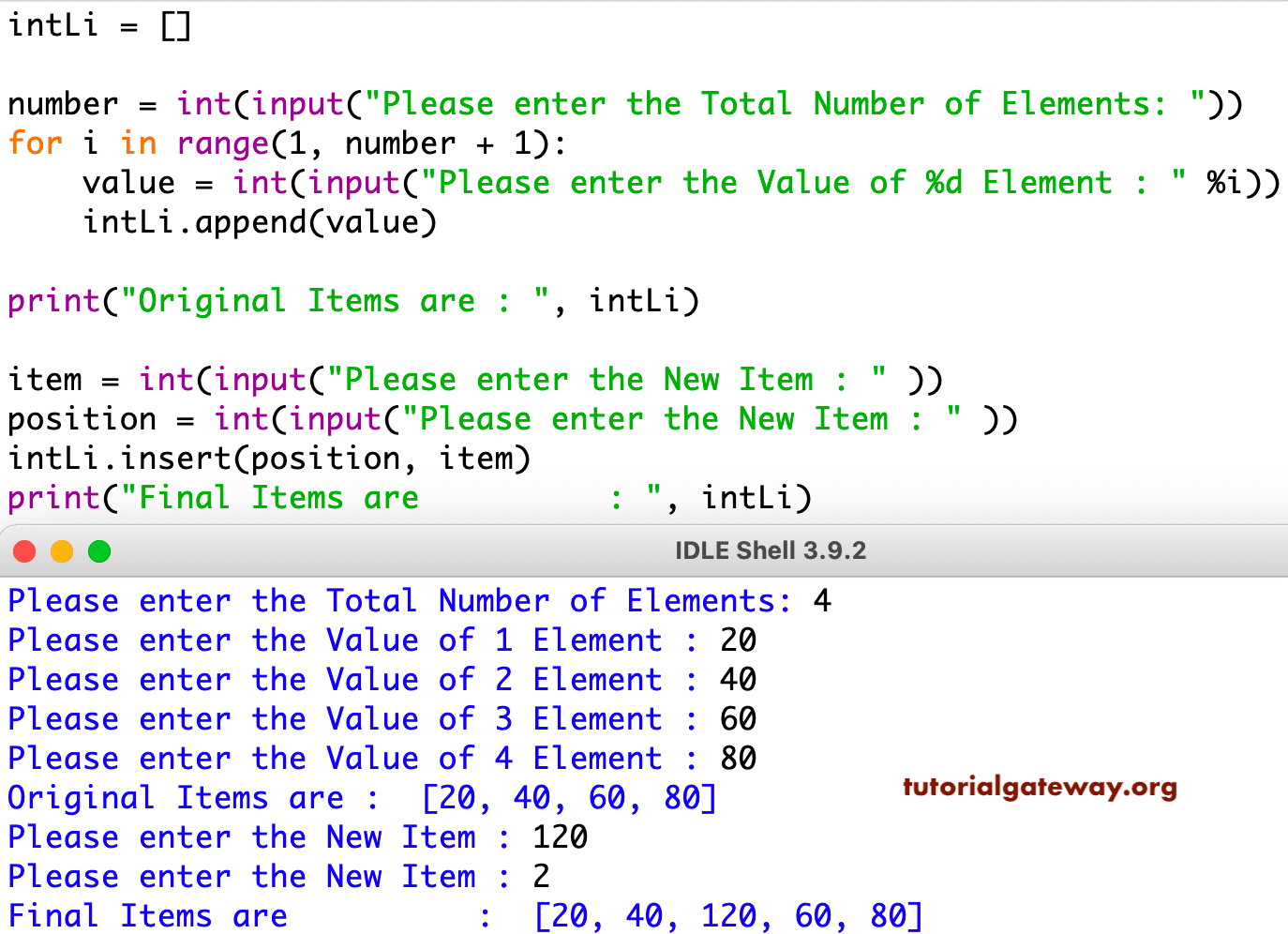
This program is identical to the first example. However, this time, we are allowing the user to enter the total number of list items. Next, we used a For Loop to append those elements.
In the next line, the users can enter the new item they want to insert and the index position. The insert() function uses those two values and adds the user-given number at the given location.
intLi = []

number = int(input("Please enter the Total Number of Elements: "))
for i in range(1, number + 1):
    value = int(input("Please enter the Value of %d Element : " %i))
    intLi.append(value)

print("Original Items are : ", intLi)

item = int(input("Please enter the New Item : " ))
position = int(input("Please enter the New Item : " ))
intLi.insert(position, item)
print("Final Items are          : ", intLi)
Inserting an element at the beginning of a list
We can utilize the Python list insert () function to add an item/element at the beginning of the list. As we all know, the list is at the index position 0, so if we place 0 as the first argument and the value (list item) as the second parameter, the insert() function adds that number to the starting position of the list.
a = [10, 20, 30, 40]

a.insert(0, 120)
[120, 10, 20, 30, 40]Inserting an element at the end of a list
The following example uses the len() method to find the length of a list and uses it as the index position. So that the Python list insert() function adds a new fruit element to the last position of the list.
fruits = ['Apple', 'Orange', 'Kiwi']
fruits.insert(len(fruits), 'Grape')
print(fruits)
['Apple', 'Orange', 'Kiwi', 'Grape']Adding an item to a mixed list
Let me use the insert() function to add a new item (Banana) to the mixed list of numbers and strings at the 2nd position.
MiLi = ['apple', 1, 5, 'Kiwi', 'Mango']

MiLi.insert(2, 'Banana')
print(MiLi)
['apple', 1, 'Banana', 5, 'Kiwi', 'Mango']Insert a list item before a particular element
When the situation is to add an item before a specific list element, we must use the index() function to find the index position of that specific item. Next, use that value in the Python list insert () function to add an item. The following examples add 100 before 30.
n = [10, 20, 30, 40, 50]
i = n.index(30)
n.insert(i, 100)
print(n)
[10, 20, 100, 30, 40, 50]Python list insert() function with an index out of range
Unlike other functions, when we pass an index value out of range, the insert() function does not raise any error. Instead, it inserts the new item as the last list element.
Although there are four items in a list, the following example uses 30 as the index position to insert 100. Instead of raising an error, the insert () function adds 100 at the last position.
n = [10, 20, 30, 40]

n.insert(30, 100)
print(n)
[10, 20, 30, 40, 100]Inserting into an empty list
As the original list has no existing items, it is advisable to use 0 as the index position to insert a new item. However, if you pass any other number (other than 0), the insert() function won’t raise any error. Instead, it adds a new value at the first position.
n = []

n.insert(0, 100)
print(n)
[100]Advanced Python list insert() function examples
Inserting a list into another list (nested)
This time, we used the insert() function on the nested list to add a list of two items as a single item of the nested list at a given index position 2.
n = [[71, 222], [222, 13], [14, 15], [99, 77]]

n.insert(2, [33, 55])
print(n)
[[71, 222], [222, 13], [33, 55], [14, 15], [99, 77]]Insert set elements into a list
The following example adds a set of two items to an existing integer list at the 2nd index position.
l = [10, 20, 30]
s = {99, 999}

l.insert(2, s)
print(l)
[10, 20, {99, 999}, 30]Inserting a tuple as a list item
The following Python list insert() function example adds a tuple of three items to an existing list at the 1st index position.
l = [10, 20, 30, 40]
t = (5, 15, 25)

l.insert(1, t)
print(l)
[10, (5, 15, 25), 20, 30, 40]Inserting a dictionary as a single list item
Similar to the above, we can use the list insert() function to add a dictionary as a single item to an existing list.
l = [10, 20, 30, 40]
d = {'ID': 10, 'Name': 'John'}

l.insert(3, d)
print(l)
[10, 20, 30, {'ID': 10, 'Name': 'John'}, 40]Difference between Python list insert(), append(), and extend()?
The built-in list insert(), append(), and extend() functions are useful to add new items to an existing list. However, they differ in the insert operation.
- insert(): It adds a new (single) item at any given position (start, end, middle, etc).
- append(): It adds a new item at the end of the list. Usually, append() is faster compared to insert() because there is no position shifting. The insert() method shifts the existing list items to the right to allocate space for the new items. However, the append() inserts at the last position, so it is naturally faster and more efficient.
- extend(): It adds or concatenates a new list to the end of the existing list. It helps add multiple items at a time.
n = [1, 2, 3, 4]
n.insert(3, 100)
print(n)
n.append(5)
print(n)
i = [10, 20]
n.extend(i)
print(n)
[1, 2, 3, 100, 4]
[1, 2, 3, 100, 4, 5]
[1, 2, 3, 100, 4, 5, 10, 20]