
The Python isnumeric() function is used to check whether characters in the original string are numeric or not. And if all values (characters) are numeric, the isnumeric() method returns True; otherwise, it returns False. It is helpful to validate user inputs, data processing, parcing CSV data, etc.
Example: Let me use the isnumeric() function check whether the given string contains numeric characters or not.
s = '99'
print(s.isnumeric())
TruePython isnumeric() syntax
The syntax of the isnumeric function is
String_Value.isnumeric()
Parameters: The isnumeric() does not take any parameters.
Return Value: It returns a Boolean True or False as output.
- True – If the given string is not empty and all characters are numeric. Here, numeric means numbers, fractions, subscript, superscript, exponents, or Unicode characters.
- False – If the given string contains at least one non-numeric character. If the string is empty or contains whitespaces, it returns False.
Python isnumeric() function examples
The following set of examples helps you understand the isnumeric() function. Please refer to the string and string functions articles to understand them in Python.
Working with Numbers
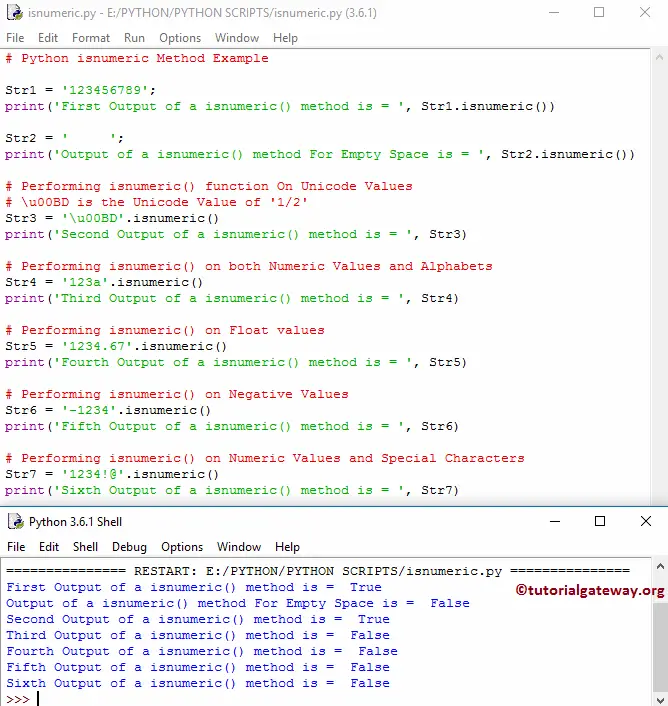
In the following example, we declared a string of numbers. Next, we used the isnumeric() function to check whether the string is numeric. As the original string has only numbers, the isnumeric() function returns True as output.
Str1 = '123456789';
print('First Output = ', Str1.isnumeric())
First Output = TrueWhen we use the isnumeric() function on a floating-point number, it will return False as output. It does not recognize the dot operator, so it returns False.
# Performing on Float valuesStr5 = '1234.67'.isnumeric()
print('Fourth Output  = ', Str5)
FalseEven the Python isnumeric() function does not recognize the negative sign (symbol) in a string. So, if we use it against the negative numbers in a string, the isnumeric() function returns False.
# Performing on Negative ValuesStr6 = '-1234'.isnumeric()
print('Fifth Output  = ', Str6)
FalseSimilarly, the isnumeric() function won’t work with numbers with thousand separators.
s = '100,000';
print(s.isnumeric())
FalseWorking with an empty string
The built-in isnumeric() function returns False when the given string is empty or if it has blank spaces.
s = '';
print(s.isnumeric())
FalseLet me try the string with whitespaces. As you can see, it returns False.
Str2 = '     ';
print('Output of a method For Empty Space is = ', Str2.isnumeric())
Output of a method For Empty Space is = FalseChecking non-numeric characters
In the following example, we used a string with both numeric values (123) and an alphabet character (a). When we apply the isnumeric() function on a mixed connection, it will return False. It checks every character for a numeric value; if it finds one non-numeric character, it stops looking and returns false.
# Performing on both Numeric Values and Alphabets
Str4 = '123a'.isnumeric()
print('Third Output  = ', Str4)
Third Output = Falseisnumeric() function on Special Characters
# Performing on Numeric Values and Special Characters
Str7 = '1234!@'.isnumeric()
print('Sixth Output  = ', Str7)
Sixth Output = FalsePython isnumeric() function on Unicode numeric characters
The built-in string isnumeric() function supports the Unicode characters. When you use isnumeric() on Unicode numeric characters, it will return True.
# Performing On Unicode Values
# \u00BD is the Unicode Value of '1/2'
Str3 = '\u00BD'.isnumeric()
print('Second Output  = ', Str3)
Count and remove Numeric Characters in a string
In the example below, the for loop iterates over the string characters. On each iteration, we use the isnumeric() function to check whether the character is numeric. If true, increment the counter value. Otherwise, add that character to the new string.
s = '150apples120 bananas'

count = 0
a = ""
for ch in s:
    if ch.isnumeric():
        count += 1
    else:
        a += ch

print("Total Numeric Characters =", count)
print("String without Numeric Characters =",a)
Total Numeric Characters = 6
String without Numeric Characters = apples bananas
Python isnumeric() vs isdecimal() vs isdigit()
- isnumeric(): It checks whether all characters in a given string are numeric values. It supports numbers, Roman numbers, subscripts, superscripts, and vulgar fractions.
- isdecimal(): It checks for decimal values only.
- isdigit(): It supports the decimal values, superscripts, and subscripts.
n = '24'
print(n.isnumeric())
print(n.isdecimal())
print(n.isdigit())
True
True
True
Let me use the Vulgar fraction values
n = '\u2153'
print(n.isnumeric())
print(n.isdecimal())
print(n.isdigit())
True
False
False
This time, use subscripts or superscripts.
n = '2²'
print(n.isnumeric())
print(n.isdecimal())
print(n.isdigit())
True
False
True