
The Python while loop is used to repeatedly execute a block of statements for a given number of times until the given condition is false. A while loop starts with a condition; if the condition is True, then the statements inside it will be executed. If the given condition is false, it won’t execute the code block at least once, which means it may execute zero or more times.
Python while loop syntax
The basic syntax of the while Loop is as follows:
while (Condition or Expression):
   statement 1
   statement 2
    ………….
# This is the statement Outside of it but inside the Program
From the above syntax:
- Condition or expression: It is a Boolean expression that returns True or False. If the condition is True, the statements inside it will execute.
- Statements: The line of code that has to be repeated N times.
Once you hit enter after a colon, the Python while loop will start the next statement with a tab space, and this Tab space acts as curly braces ({ }) in other programming languages.
First, the controller will check the expression inside the while Loop. If the condition is True, then the statement or group of statements under this block will execute. If the expression is False, the control will exit the code block and execute other statements outside.
NOTE: There is an else block and control statements that we can use inside a while loop. In the coming sections, we explain them. For now, concentrate on the basic while loop syntax.
Python while loop flow chart
The following flowchart explains the working functionality of a while loop visually and perfectly.
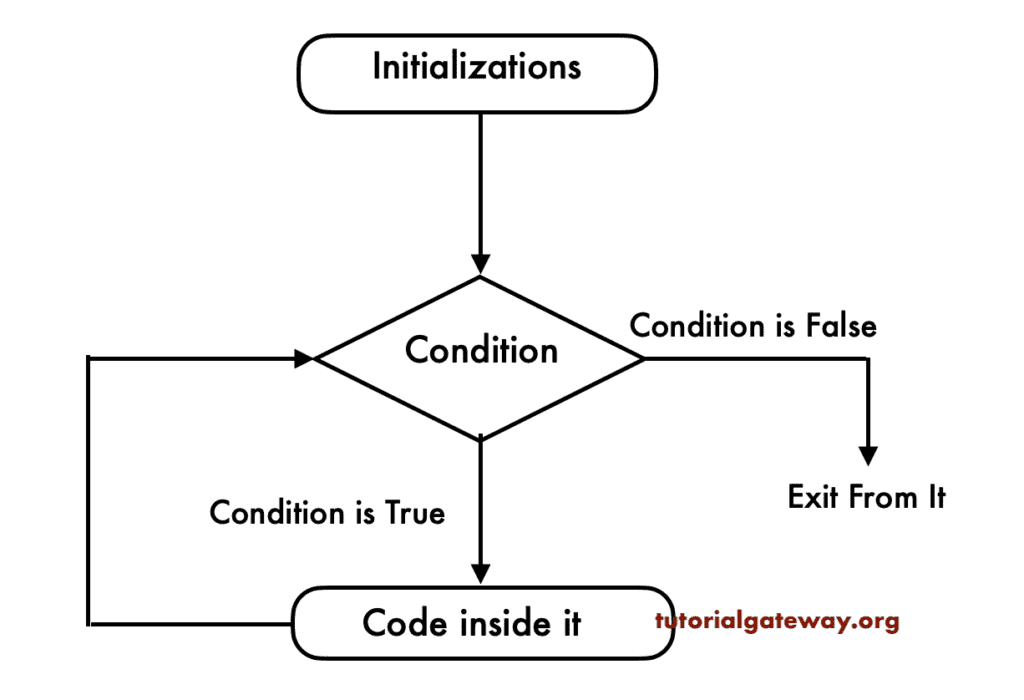
The while loop checks for the condition at the beginning, and the code inside it will run as long as the condition is evaluated to True. It follows the following steps
- Initialize the variable that we used inside the while loop. For example, initializing the counter variable to 1.
- The first step is to evaluate the Python while loop condition. If the condition evaluates to True, it will execute the code inside. For example, (i < 5)
- Next, we must use the Arithmetic Operator inside the while loop to increment and decrease the counter value (i += 1 or i -= 1).
- After the value increments, the control moves to the top of the while loop. Next, it will again check the expression.
- In short, on each iteration, the control evaluates the while loop condition. As long as the condition is met, the statements in the while loop will be executed.
- If the expression becomes false, then it will exit from the while loop.
Basic Python while loop example
The following example demonstrates the while loop working functionality in iteration wise. Here, we declared an integer variable and assigned the value 1. Next, the while loop condition checks whether the I value is less than or equal to 3. If True, it enters the loop block.
Within the Python while loop, we used the print() function to display the Welcome message as output. The next line increments the I value by 1. It means the program below prints the Welcome message three times.
NOTE: After incrementing the i value on each iteration, check the while loop condition to find whether the result is true or false.
i = 1
while i <= 3:
    print("Welcome")
    i += 1
Welcome
Welcome
Welcome
Python while loop to print numbers from 1 to 10
The following program uses the while loop to iterate and print the natural numbers from 1 to 10. The working functionality of the while loop with respect to the example below is
- i = 1: We declared an integer variable and assigned 1.
- while i <= 10: It is an entry point to the while loop. Initially, it checks whether the I value is less than or equal to 10. If true, control enters the Python while loop.
- As the condition is True, it executes the print statement and prints 1 as the output.
- i += 1: The assignment operator increments the i value by 1. It is the most important step.
- Again, the control moves to step 2 and checks the condition (2 <= 10). This process continues until I become 11. When i become 11, the while loop condition (11 <= 10) fails, so the control exits the while loop.
i = 1
while i <= 10:
    print(i, end = ' ')
    i += 1
1 2 3 4 5 6 7 8 9 10 Python while loop to find the sum of numbers
Let us see the while loop example for better understanding. First, we created a variable called total, which is initialized to 0.
This program allows the user to enter an integer below 10. The second line of the Python code stores the user-given integer in a variable named number. Using this number, the control will add those values to sum up to 10.
In the next line, we used the while loop expression (num <= 10). If the condition result is true, the number adds to the total. Otherwise, it will exit from the Python while loop. We also used the + arithmetic operator to increment the number value (num = num + 1). After the increment, the process repeats until the condition evaluates to False.
There is a print statement outside of it. It executes when the condition is either True or False.
total = 0
num = int(input(" Please Enter any integer below 10:  "))
while (num <= 10):
    total = total + num
    num = num + 1
print(" Total is: ", total)
We are going to enter the number 5. It means, total = 5 + 6 + 7 + 8 + 9 + 10 = 45
Please Enter any integer below 10: 5
Total is: 45
Python while loop with reverse step
The following example demonstrates how to use a while loop to iterate over a range of numbers in reverse order, also known as a decreasing sequence. Here, we declared a variable with the value 10. The while loop condition (i > 0) makes sure ‘i’ value is greater than zero. When the ‘i’ value becomes 0, the condition fails, and control will exit the while loop.
Inside the while loop, we use the print statement to print the ‘i’ value on each iteration. In the next line, we use the assignment operator to decrement the value by 1 for each iteration.
i = 10
while i > 0:
    print(i, end = ' ')
    i -= 1
10 9 8 7 6 5 4 3 2 1NOTE: For more information, please refer to the Python Program to Print Natural Numbers in Reverse Order article.
Python while loop to find the factorial of a number
In the example below, we use a while loop to find the factorial of a given number.
n = 5
fact, i = 1, 1
while i < n:
    fact *= i
    i += 1
print(fact)
24Python while loop with Lists
Similar to a for loop, we can use a while loop to iterate over the list items and access them based on the index position. Additionally, we can use a while loop to modify the list items by performing mathematical calculations at a specific index position.
n = [10, 20, 30, 40, 50]
i = 0
while i < len(n):
    print(n[i], end = ' ')
    i += 1
10 20 30 40 50For modifications, use the code below. It uses a while loop to multiply each list item by 2.
n = [10, 20, 30, 40, 50]
i = 0
while i < len(n):
    n[i] *= 2
    i += 1

print(n)
[20, 40, 60, 80, 100]While loop with a dictionary
Unlike lists, dictionaries are complex data structures with both keys and values. It means we need keys to access the values. The Python while loop condition checks whether the i value is less than the total number of dictionary keys. If true, access the first key using the list index position and then access the dictionary item of that particular key.
emp = {
    "name": "Tracy",
    "age": 25,
    "Job": "Developer",
    "Income": 100000
}

keys = list(emp.keys())
i = 0
while i < len(keys):
    key = keys[i]
    print(key, ":", emp[key])
    i += 1
Result
name : Tracy
age : 25
Job : Developer
Income : 100000
While loop with zero iterations
When working with a Python while loop, we must be careful with the variable initialization and the condition. For instance, if we use a condition that always becomes false, there will be zero iterations.
For example, in the following program, the value of i is 20. However, the while loop condition checks whether the value of I is less than or equal to 10 (20 <= 10), which is always false. So, the controller won’t execute the code inside the while loop at all.
i = 20
while i <= 10:
    print(i, end = ' ')
    i += 1
NOTE: Use the else block to inform the user to use the value less than 10.
Single statement while loop in Python
Because of its simple syntax nature, if there is a single statement in the while loop body, we can place it in the same line as the while header. The syntax is shown below.
while expression: statement
As you can see, we have placed the statement after the colon, and it is legal and error-free. However, if there are multiple statements, then we must place them on separate lines (inside the while loop body).
To demonstrate the single statement while loop in Python, we use the print statement after the while condition colon. The example below prints 1 output infinitely because there is no increment of i.
Here, the control checks the expression (i < 5). As it is true, it will execute the print statement. Next, the control jumps back to the expression (i < 5), as it has not changed anything; it’s still written as a true value, so it executes the print statement with the same value (1), and this process will go on infinitely.
i = 1
while i < 5: print(i, end = ' ')
Infinite while Loop in Python
There are many possibilities for creating an infinite while loop. The above-mentioned single statement while loop is one of the common scenarios.
If you forget to increment or decrement the value inside the while loop, it will repeatedly execute infinitely (also called an infinite loop).
x = 1
while x < 10:
    print("Value = ", x)
Value = 1
Value = 1
Value = 1
Value = 1
Value = 1
Value = 1
....
....
...
Here, x is always 1, and the control evaluates the while loop condition (x < 10). As the x (1) value is less than 10, the print statement prints the x value as output. Next, the control jumps to the Python while loop header to test the condition. As we haven’t updated the x value inside a while loop, the control checks (1 < 10). It means x is always 1 and it is less than 10. So the code will execute infinitely.
To solve this situation, let us add the Arithmetic operator (x = x + 1) inside the above while loop example.
# Infinite Solution

x = 1
while x < 10:
    print(x)
    x = x + 1 # To increment X value
When it reaches 10, the expression will fail.
1
2
3
4
5
6
7
8
9
Apart from the above, there are intentionally infinite while loops. These are powerful, and one such scenario is making a Python while loop condition as True until the user provides the correct information.
In the example below, we used a while loop with a condition of Boolean true. It means the condition is always evaluated as true, and the print statement inside it will execute infinitely.
while True:
    print("Hello")
Use while loop for Password Validation
In the example below, we allow the user to enter the password. When the user enters the wrong password, the else block informs the user about the wrong entry. Inside the while block, the if statement checks whether the user-given password matches the existing one. If true, the break statement exits the control from a while loop. If we miss the break statement, it will execute infinitely.
correct = "abcd"
while True:
    password = input("Enter password: ")
    if password == correct:
        print("Login Successful")
        break
    else:
        print("Wrong password. Try again")
Enter password: 1234
Wrong password. Try again
Enter password: abcd
Login Successful
Handling while loop User Input Errors using try except
In the password validation example, we have seen how to allow the user to enter multiple passwords using a while loop and an else block. However, when the user enters the wrong data type, we need a try and except block to handle the ValueError or any other error type.
In the example below, the Python while loop asks the user to enter any integer. As it is wrapped inside the try block, if the int() function fails to convert the user-given value to an integer, it raises ValueError and is caught by the except block, and returns Invalid Input.
while True:
    try:
        n = int(input("Enter an integer: "))
        print("You entered:", n)
        break
    except ValueError:
        print("Invalid input!")
Enter an integer: u
Invalid input!
Enter an integer: 10
You entered: 10
Python while loop Else Example
In all our previous examples, we used a while loop to iterate over items and perform some operations when the given condition is True. Once the while condition is false, the control exits the loop. However, the while loop has the else block that can be executed once the while condition fails.
This programming allows us to use the else statement with while loop statements, which works similarly to the If Else statement.
- The statements inside the while loop block will execute if the condition is True.
- If the condition is False, the statements inside the Else clause will execute. When we use the Break statement to break the execution of the loop, then the Else block will not be executed. Please refer to the If Else and Break statement articles.
This while loop else program allows users to provide an integer below 10. Using this number, the control will add those values up to 10.
The condition (number<= 10) checks whether the number is less than or equal to 10. If the expression result is true, the number is added to the total.
Next, we used the + operator to increment the number value in the Python while loop. After the increment, the process will repeat until the condition returns False.
In the next line, we used the print function, and this line will display the value inside the total for every iteration. If the condition evaluates to False, the print function inside the else block will execute the message.
total = 0
number = int(input(" Please Enter any integer below 10:  "))
while (number <= 10):
    total = total + number
    number = number + 1
    print(" Value of Total : ", total)
else:
    print(" You Value is Greater Than 10 ==> This is from Else Block ")
Here we entered the value as 5; when it reaches 10, the condition will fail. So it will enter into the else block and print the statements inside the Else clause.
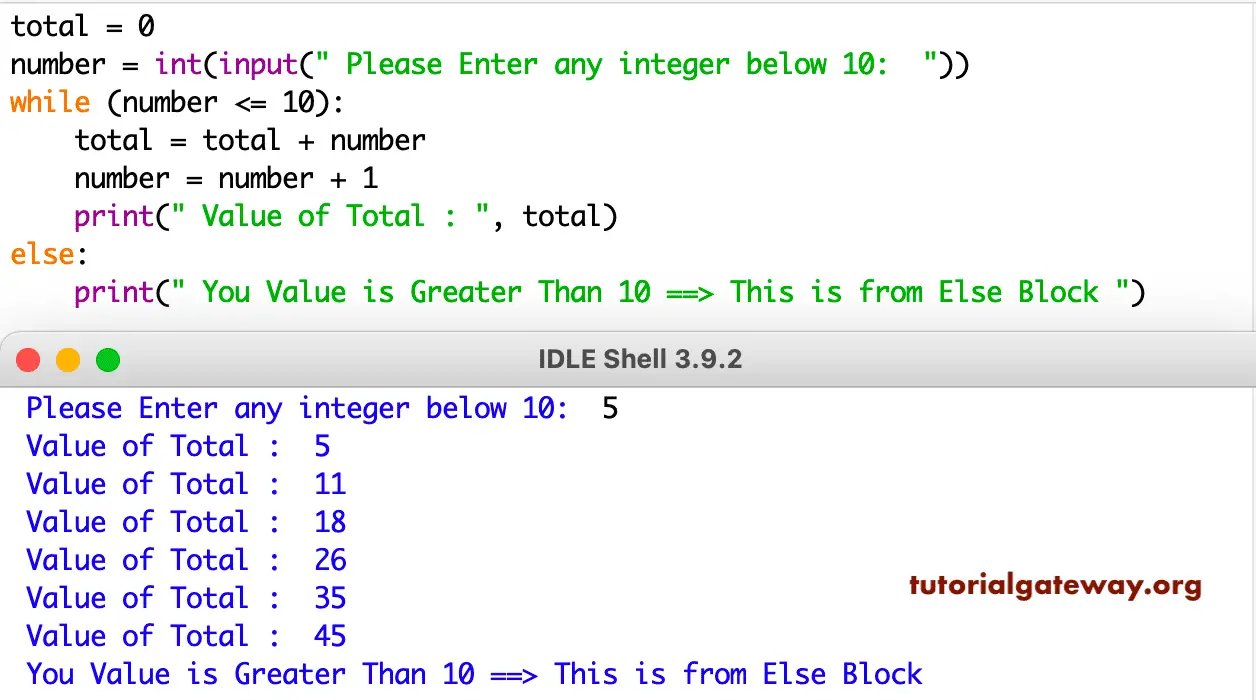
NOTE: The while loop’s else block executes after the code inside the while block completes execution and is not terminated by a break statement.
Nested while loop in Python
This programming language allows you to place one while loop inside another to perform nested loops. The nested while loops are helpful to iterate over multidimensional data, such as rows and columns.
For each outer while loop, the control executes all iterations of the nested while loop, and the control moves to the outer while loop condition for evaluation. If it is True, it will process the nested iterations, and the process repeats.
In the example below, we used a nested Python while loop to iterate over the rows and columns, and print the rectangle pattern of stars. On each row iteration, the nested while loop performs all iterations starting from j = 0 to 6. Once j becomes 7, the control exits the column loop and enters the row loop, and checks if i’s value is less than 10.
rows, columns = 10, 7
i = 0
while i < rows:
    j = 0
    while j < columns:
        print('*', end = '  ')
        j += 1
    i += 1
    print()
*  *  *  *  *  *  *
*  *  *  *  *  *  *
*  *  *  *  *  *  *
*  *  *  *  *  *  *
*  *  *  *  *  *  *
*  *  *  *  *  *  *
*  *  *  *  *  *  *
*  *  *  *  *  *  *
*  *  *  *  *  *  *
*  *  *  *  *  *  *
TIP: When you know the total number of iterations, use the for loop. If you don’t know the total number of iterations, go with the while loop.
While loop control statements
Well, we have used a Python while loop to iterate over a range of items or lists. However, there are three control statements that we can use to restrict or stop the control from executing for a few iterations.
- Break: Stop executing further iterations and exit the control from a while loop.
- Continue: Stops or skips the current iteration and continues the next iteration.
- Pass: To bypass the None or unidentified values.
Python while loop with continue statement
The continue statement will stop the current iteration and move the control to the beginning of the while loop. It is very helpful to jump a few iterations from execution. To demonstrate it, the example below calculates the sum of natural numbers from 1 to 10, skipping 5 and 8.
Starting value of N is 1, and the while loop condition is true until N becomes 11. Inside the while loop body, we add n value to the total on each iteration and increment n value by 1. We have also used the if statement to check whether the N value is 5 or 8. If N becomes 5 or 8, the continue statement will stop the current iteration and move the control to the while header.
total = 0
n = 1
while n <= 10:
    if n == 5 or n == 8:
        n += 1
        continue
    total = total + n
    n += 1

print(total)
42Python while loop with break statement
The break statement brings the control out of the while loop. We can use the break statement to terminate the loop immediately without completing full iterations. One of the most useful scenarios is utilizing the break statement in a while loop to stop executing the same code infinitely.
The while loop example below is similar to the continue statement example. However, this time, we use the break statement in combination with the if statement. It means the code below finds the sum of numbers from 1 to 7.
On each Python while loop iteration, the N value is added to the total, and n is incremented by 1. However, when n becomes 7, the control will execute the break statement, and it stops the looping process and exits the while loop. So even though the while loop condition (n <= 10) is true, the control will never visit the header condition to process the next iteration.
total = 0
n = 1
while n <= 10:
    total = total + n
    n += 1
    if n == 7:
        break
print(total)
21Python while loop with pass statement
By default, the pass statement does nothing. However, we can use them to skip or do nothing for a few iterations. It is very useful to loop through the data and handle the wrong data in a later stage.
In the example below, we declared a list of five items where two of them are None values. Here, the while loop iterates over those list items. However, when it encounters None values, the pass statement does nothing and prints the correct values.
data = [None, "Apple", None, "Cherry"]
i = 0

while i < len(data):
    if data[i] is None:
        pass
    else:
        print(data[i])
    i += 1
Apple
Cherry
Do while loop in Python
By default, this programming language does not support do while loop. However, we can create or convert an existing while loop into a do while. As we all know, a do while loop runs at least once and checks the condition at the iteration end. So, we can use the while loop expression that always returns True. Next, use a conditional statement to check the condition to terminate the loop.
In the example below, the while loop expression is always true, so it acts like a do while loop. Inside the loop, the if statement with the break statement acts as the expression evaluation. If it returns True, the break statement terminates the loop.
while True:
    print("Welcome Guys!")
    again = input("Repeat? (y/n): ")
    if again == "n":
        break
Welcome Guys!
Repeat? (y/n): y
Welcome Guys!
Repeat? (y/n): n
Do while loop Menu Program
In the Python while loop example below, we used the while True condition, which always returns True (Acts like a do while loop). When the user selects 1, it performs addition, 2 means subtraction, and 3 means exit program. However, when any other value is given, it executes the else block.
NOTE: We can also place the Menu inside the while loop code block. However, it repeats on each entry.
a, b = 50, 10
print("\n=== MENU ===")
print("1. Add Numbers")
print("2. Subtract Numbers")
print("3. Exit")
while True:
    choice = input("Enter your choice: ")
    if choice == "1":
        print("Sum =", a + b)
    elif choice == "2":
        print("Subtract =", a - b)
    elif choice == "3":
        print("Exiting program...")
        break
    else:
        print("Invalid choice!")
=== MENU ===
1. Add Numbers
2. Subtract Numbers
3. Exit
Enter your choice: 2
Subtract = 40
Enter your choice: 1
Sum = 60
Enter your choice: 3
Exiting program...