For organizations using Pullfrog in private repos, all repository activity is private and all actions are triggered by trusted team members. The risks in this scenario are minimal. The rest of this document primarily applies to users who are using Pullfrog on public repos.
| Layer | Protection |
|---|---|
| System prompt | Instructs agents to refuse exfiltration attempts |
| Untrusted input isolation | Issue and PR bodies are never inlined into the prompt |
| Secret masking | Redacts secrets from all logs |
| Secret isolation | Repo secrets not passed to actions by default |
| Shell environment scrubbing | Only minimal env vars reach the agent subprocess |
| Filesystem sandbox | Hides Pullfrog-managed on-disk secrets and blocks env injection / git-config tampering from shell |
| Short-lived tokens | GitHub tokens expire and are revoked after each run |
| Permission checks | Only collaborators can trigger runs by default |
| Protected branches | Agents cannot push directly to the default branch |
System prompt
All runs triggered by Pullfrog include a system prompt with instructions to identify and avoid common exfiltration vectors. The boundaries of the user prompt are indicated in the structure of the prompt, so the agent knows where the system prompt ends and the user prompt begins.Untrusted input isolation
The bodies of issues and pull requests are user-generated content and a primary prompt-injection vector. Pullfrog never inlines them into the agent’s prompt. The agent receives the event metadata it needs to get oriented (such as the title), but must fetch the body on demand through a Pullfrog tool — so untrusted text always reaches the model as clearly-delineated tool output rather than as trusted instructions.Secret masking
All secrets are auto-masked using GitHub’s first-party secret masking feature, so they cannot be publicly logged in GitHub Actions logs by accident.Secret isolation
Repository secrets are not automatically available to the Pullfrog action. You must explicitly pass the necessary secrets (like API keys) via environment variables in your workflow configuration. This gives you full control over which secrets are exposed to the agent.Shell environment scrubbing
Pullfrog supports a Restricted shell permission, which automatically scrubs sensitive environment variables from the Shell tool. This works across all agents.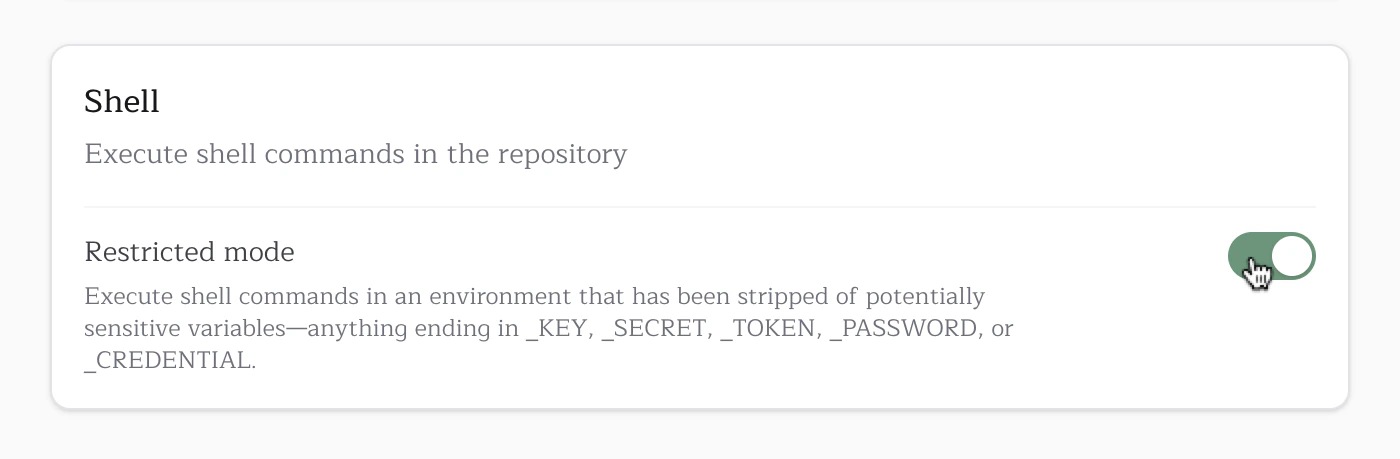
env or printenv. The shell environment uses a default-deny allowlist — only known-safe GitHub Actions runner variables, system variables, and toolchain variables are passed to shell commands. Everything else (secrets, API keys, database URLs) is stripped.
Sensitive-looking variables (names ending in _TOKEN, _KEY, _SECRET, _PASSWORD, _CREDENTIAL) are filtered by default even when the prefix would otherwise permit them — so GITHUB_TOKEN and GH_TOKEN, for example, do not pass through despite the GITHUB_* prefix being allowed. Pullfrog’s own git operations use a separate, scoped authentication mechanism (ASKPASS) that does not expose tokens in the environment, so you do not need to allowlist them for git to work.
Note that the agent process itself receives the full environment to ensure all configured tools and integrations work correctly. The filtering happens at the shell execution layer, which is the primary vector for exfiltration attacks.
In CI, shell commands also require Linux PID namespace isolation (unshare or sudo unshare). If namespace isolation is unavailable, shell execution fails closed instead of running unsandboxed.
Default allowed variables
The following variables are automatically passed through to shell commands. Any variable not in this list is blocked by default. Prefix-matched — all variables starting with these prefixes are allowed, except any whose name ends in a sensitive suffix (_TOKEN, _KEY, _SECRET, _PASSWORD, _CREDENTIAL). Those require an explicit allowlist entry:
| Prefix | Description |
|---|---|
GITHUB_* | GitHub Actions runner metadata and workflow context |
RUNNER_* | Runner configuration and paths |
JAVA_HOME_* | JDK version paths (e.g., JAVA_HOME_17_X64) |
GOROOT_* | Go installation paths |
System variables
System variables
CI, HOME, LANG, LOGNAME, PATH, SHELL, SHLVL, TERM, TMPDIR, TZ, USER, XDG_CONFIG_HOME, XDG_RUNTIME_DIR, DEBIAN_FRONTENDRunner image toolchain variables
Runner image toolchain variables
ACCEPT_EULA, AGENT_TOOLSDIRECTORY, ANDROID_HOME, ANDROID_NDK, ANDROID_NDK_HOME, ANDROID_NDK_LATEST_HOME, ANDROID_NDK_ROOT, ANDROID_SDK_ROOT, ANT_HOME, AZURE_EXTENSION_DIR, BOOTSTRAP_HASKELL_NONINTERACTIVE, CHROME_BIN, CHROMEWEBDRIVER, CONDA, DOTNET_MULTILEVEL_LOOKUP, DOTNET_NOLOGO, DOTNET_SKIP_FIRST_TIME_EXPERIENCE, EDGEWEBDRIVER, GECKOWEBDRIVER, GHCUP_INSTALL_BASE_PREFIX, GRADLE_HOME, HOMEBREW_CLEANUP_PERIODIC_FULL_DAYS, HOMEBREW_NO_AUTO_UPDATE, ImageOS, ImageVersion, JAVA_HOME, NVM_DIR, PIPX_BIN_DIR, PIPX_HOME, PSModulePath, SELENIUM_JAR_PATH, SGX_AESM_ADDR, SWIFT_PATH, VCPKG_INSTALLATION_ROOTEnvironment allowlist
You can configure additional environment variables to pass through via the Environment allowlist field in your repository’s security settings. Add one variable name per line. This is useful for variables your build tools or dependencies require (e.g.,DATABASE_URL, NPM_TOKEN), or for letting prompts use tools that need them (e.g., allowlisting GH_TOKEN so gh CLI commands work).
The Shell isolation toggle in the repo console’s Security card controls this. It is always on for public repositories and cannot be disabled. Private repositories also default to having it on (Restricted mode); repo admins can turn it off from the Security card to grant unrestricted shell access (Enabled mode).
Filesystem sandbox
In addition to environment scrubbing, every shell command in CI runs inside a Linux mount namespace that masks three classes of paths from the agent’s bash subprocess. Applies to both Restricted and Enabled shell modes — the protection isn’t gated on environment filtering.- Pullfrog-managed on-disk secrets at
/var/lib/pullfrog/(today: Codex subscription credentials; future: any other credential Pullfrog materializes). A fresh empty tmpfs overlays this directory inside the sandbox, so shell commands see nothing while Pullfrog’s own processes still read/write the real file. - GitHub Actions runner file-command directory (
$RUNNER_TEMP/_runner_file_commands/). This is whereecho X >> $GITHUB_ENVwrites environment-variable injections that would otherwise propagate to subsequent workflow steps with their own repo secrets. A tmpfs overlay catches any agent writes before the runner harvests them. - Git code-execution config: the entire
.gitdirectory is mounted read-only via self-bind + remount, so an agent cannot plant a malicious git filter or hook (in.git/config,.git/config.worktree,.git/modules/*/config,.git/hooks/, or.git/info/attributes) that fires during downstreamgitoperations in later workflow steps. This does not affect Pullfrog’s own commits or merges — those run through a separategitbinary outside the sandbox.
.git — including the .git gitfile pointer and nested */.git gitfiles in worktree / submodule layouts — are blanket-denied (nothing legitimately writes .git via native tools), while native reads are denied only for .git/config. The mount-namespace protection is the load-bearing defense for the shell; the native-tool rules are defense in depth.
Like environment scrubbing, this protection is automatic in CI and is independent of the shell permission tier. It is a no-op on local development machines (where Pullfrog is not protecting against the developer).
Short-lived tokens
Pullfrog uses GitHub OIDC to acquire installation tokens that are scoped to the repository and short-lived. Moreover, they are explicitly revoked at the end of each run. The token is never placed in the agent’s environment or written into.git/config. Git operations authenticate through ASKPASS — a localhost helper that hands git a one-time code per operation and revokes it the moment the operation completes. A code replayed afterward is rejected and triggers immediate revocation of the underlying GitHub token, so a stashed credential cannot be reused later in the run.
Permission checks
Pullfrog determines who triggered each run by checking the actor’s permission level on the repository through the GitHub API. Collaborators (users with write or admin access) are trusted; everyone else is treated as a non-collaborator. Pullfrog can trigger agent runs in response to actions performed by non-collaborators, like mentions, new issues, and new PRs.- By default, these triggers are all disabled. Agent runs cannot be triggered by non-collaborators unless a repo admin explicitly enables the corresponding trigger.
- Any run triggered by a non-collaborator is automatically capped at the Restricted shell tier (secret-scrubbed shell environment): it can never be escalated to unrestricted shell access, no matter how the repo is configured. This cannot be disabled.
Protected branches
By default, agents cannot push directly to your repository’s default branch — whatever it’s named (main, master, or something custom). They must create feature branches and open pull requests. This is the restricted push tier, the default for public repos; a repo admin can loosen it to enabled (allow direct pushes) or tighten it to disabled (no pushes at all). For branches other than the default, enforce protection server-side with GitHub branch protection rules.