

Serverless backfilling is available starting from v2.8.0 and is disabled by default.
Overview
When you create a materialized view (MV) on existing data, RisingWave must first process all historical records, a phase called backfill. By default, this runs on the same compute nodes as your regular streaming workloads, which can cause resource contention and increased latency for existing pipelines. Serverless backfilling runs the backfill phase on dedicated backfiller resources — a temporary resource group that RisingWave Cloud provisions separately from your main streaming compute nodes. It is serverless because you don’t manually allocate or manage resources for each new materialized view: RisingWave Cloud provisions the backfiller resource group when a backfill job starts and destroys it automatically once the job completes. This decoupling helps large backfills complete while reducing their impact on the performance of existing streaming jobs. Serverless backfilling is supported only in RisingWave Cloud. Enable it in the Backfilling section of the Resources page in the Cloud console first. See Configure serverless backfilling for portal setup, SKU, and replicas.How it works
When serverless backfilling is enabled for aCREATE MATERIALIZED VIEW statement:
- The serverless backfilling controller provisions a temporary resource group with dedicated backfiller nodes, sized by the Backfiller SKU and replica count you configure in the Cloud console.
- The backfill job runs on those dedicated backfiller nodes, separately from your main streaming compute nodes, so it doesn’t compete with existing streaming jobs for resources.
- Once all backfill fragments report completion, the MV transitions to the standard incremental streaming phase and is migrated to the default resource group.
- If the cluster restarts during backfill, the job resumes from the last completed checkpoint rather than starting over.
- Serverless backfilling is not supported for databases in non-default resource groups.
Configuration
You must enable serverless backfilling in the RisingWave Cloud console (in the Backfilling section of the Resources page) before using it. If it isn’t enabled,CREATE MATERIALIZED VIEW statements that request serverless backfilling return an error.
Session variable
Enable serverless backfilling for subsequentCREATE MATERIALIZED VIEW statements in the current session:
false. This setting only affects new DDL operations issued after the SET command; it does not change the behavior of already-running jobs.
If you set
enable_serverless_backfill through dbt, use dbt-risingwave 1.11.4 or later. Earlier versions of the plugin do not apply this session variable.Per-statement WITH clause
You can also enable serverless backfilling for a singleCREATE MATERIALIZED VIEW statement using the cloud.serverless_backfill_enabled option in the WITH clause:
Example
The following example creates a large materialized view with serverless backfilling enabled to reduce the impact of the backfill on existing streaming workloads:Example: serverless backfilling
Monitor progress
Monitoring
Use the following system catalog and metrics to track serverless backfilling jobs:| Method | Description |
|---|---|
SHOW JOBS | Lists all background DDL jobs and their current status. |
SELECT * FROM rw_catalog.rw_ddl_progress | Shows per-fragment backfill progress as a percentage. |
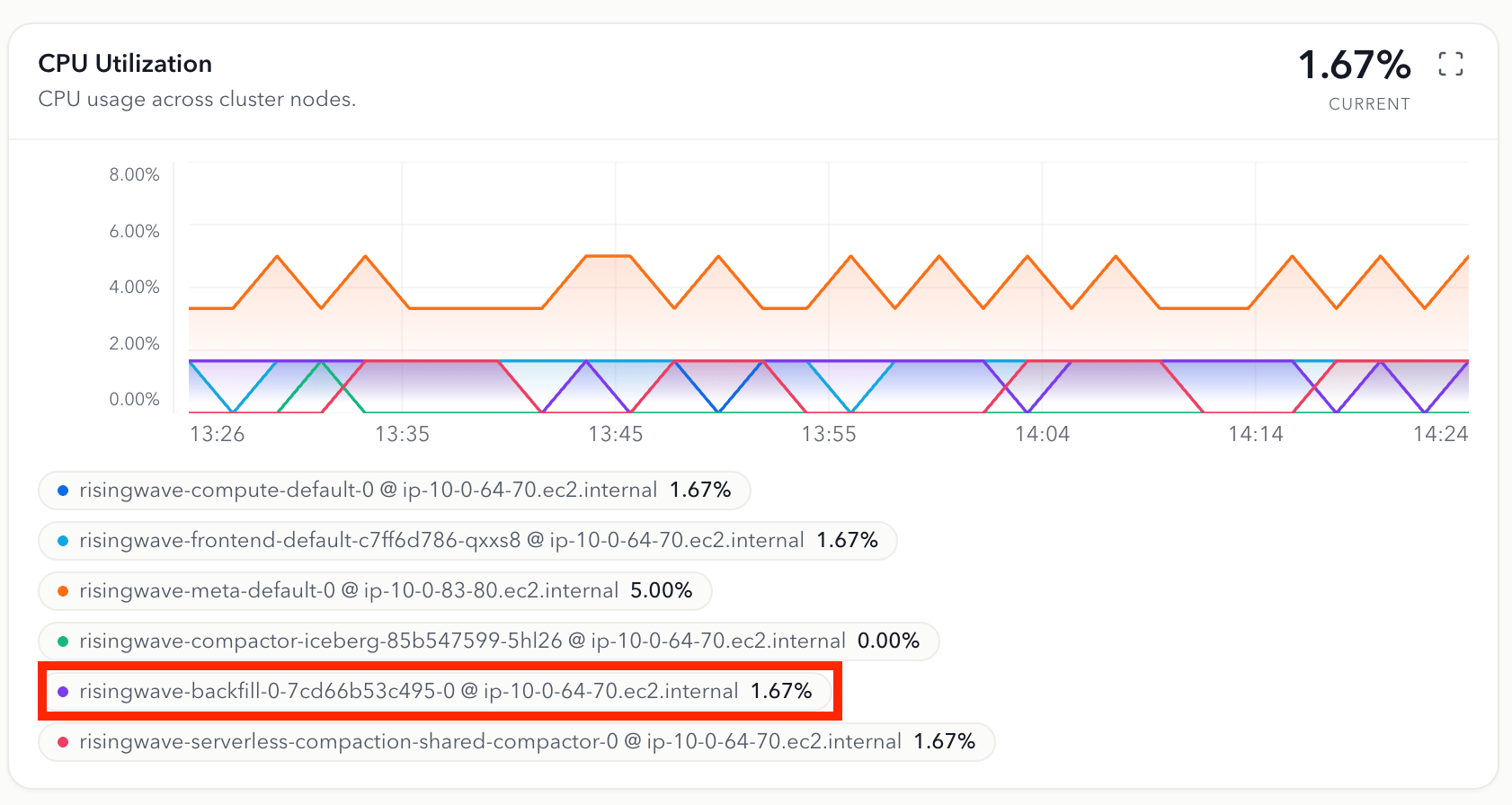
| Cloud portal Metrics page | In the cluster-node panels such as CPU Utilization, look for the risingwave-backfill-* node series to confirm that the dedicated backfiller nodes are running and to observe their CPU and memory usage. |
risingwave-backfill-0-* series is a dedicated backfiller node that RisingWave Cloud provisions for the serverless backfilling job, separate from your main compute nodes (risingwave-compute-*).
Limitations
- Serverless backfilling is supported only in RisingWave Cloud, and you must enable it in the Backfilling section of the Resources page before requesting it in SQL.
- Serverless backfilling is not supported for databases in non-default resource groups.
Related pages
- Configure serverless backfilling — Set the backfiller SKU, replicas, and other Cloud setup.
- Backfill — Overview of all backfill strategies in RisingWave.
- SET BACKGROUND_DDL — Run DDL operations in the background without blocking the client.
- CREATE MATERIALIZED VIEW — Full syntax and options for creating materialized views.
- View and configure runtime parameters — All session variables, including
enable_serverless_backfill.