Nextron THOR Cloud
| Version | 0.5.0
|
| Subscription level What's this? |
Basic |
| Developed by What's this? |
Elastic |
| Ingestion method(s) | API |
| Minimum Kibana version(s) | 9.2.0 |
To use pre-release integrations, go to the Integrations page in Kibana, scroll down, and toggle on the Display beta integrations option.
Nextron THOR Cloud is a cloud-based compromise assessment platform that runs the THOR forensic scanner on endpoints through the THOR Cloud Launcher. This integration polls the THOR Cloud API and ingests scan findings into Elastic Security for centralized threat hunting and incident response.
Agentless integrations allow you to collect data without having to manage Elastic Agent in your cloud. They make manual agent deployment unnecessary, so you can focus on your data instead of the agent that collects it. For more information, refer to Agentless integrations and the Agentless integrations FAQ. Agentless deployments are only supported in Elastic Serverless and Elastic Cloud environments. This functionality is in beta and is subject to change. Beta features are not subject to the support SLA of official GA features.
The Nextron THOR Cloud integration collects one type of data:
- Thor Forwarding — Scan results and findings from the THOR Cloud API, including detected threats, malware signatures, suspicious files, and security events identified during endpoint scans.
- A THOR Cloud or THOR Cloud Lite account with API access.
- THOR Cloud Launcher deployed on at least one endpoint and at least one completed scan before data appears in Elastic.
- Scan reports must be unencrypted (
logs_encryptedmust befalse). This integration does not ingest encrypted THOR reports. - Scans must include
thor.jsoninavailable_logs. - Supported endpoint platforms: Windows, Linux, and macOS.
This integration has been tested with:
| Component | Minimum tested version |
|---|---|
| THOR Cloud API | v1 (https://thor-cloud.nextron-services.com/ui/api-documentation) |
| THOR scanner | 10.7.x |
| THOR JSON log format | v2 (log_version: v2.0.0) |
THOR Cloud Lite is supported when scans produce unencrypted thor.json logs through the same API.
This integration supports Agentless and Elastic Agent-based data collection.
For agent-based collection, install Elastic Agent using the installation instructions.
Data flows from endpoints to Elastic as follows:
- Endpoint — THOR Cloud Launcher runs a THOR scan on the endpoint.
- THOR Cloud — Scan results and
thor.jsonlogs are uploaded and stored. - THOR Cloud API — The integration polls
/v1/scan/searchand/v1/scan/logfor new scans. - Elastic Agent (CEL input) — Retrieves logs over HTTPS and ships raw events.
- Elasticsearch data stream — The
nextron_thor_apt_scanner.thor_forwardingingest pipeline normalizes events to ECS.
The integration uses a CEL input to poll the THOR Cloud REST API. It does not require syslog or log file receivers on the Elastic Agent host.
- Log into your THOR Cloud dashboard.
- Deploy the THOR Cloud Launcher on at least one endpoint (Windows, Linux, or macOS).
- Run a scan and confirm it completes successfully.
- In the THOR Cloud dashboard, verify the scan report is not encrypted and that
thor.jsonis listed in the scan's available logs. - Navigate to General Settings → API Key, click Generate, and copy the API key. You will not be able to copy it after this step.
- Note the API Endpoint URL (default:
https://thor-cloud.nextron-services.com/api).
- In Kibana, navigate to Management → Integrations.
- Search for Nextron THOR Cloud and add the integration.
- Configure the required parameters:
- API URL: THOR Cloud API endpoint URL from Step 1
- API Key: API key from Step 1
- Initial Interval: How far back to pull scan logs on first run (default:
24h) - Interval: Duration between API requests (default:
5m)
- Save and deploy the integration.
- In Discover, open the
logs-*data view. - Filter documents by
data_stream.dataset : "nextron_thor_apt_scanner.thor_forwarding". - Confirm events from your completed scan appear within the configured polling interval.
- If no data appears, check the following:
- The scan completed with status
successfulorfailedin THOR Cloud. logs_encryptedisfalsefor the scan. Encrypted reports are skipped by this integration and will not produce events in Elastic.thor.jsonis listed inavailable_logsfor the scan.- The API key is valid and the Initial Interval covers the scan completion time.
- The scan completed with status
Note:
- Scan data is fetched incrementally based on
last_launcher_updateand the configured initial interval. - The integration supports batch processing with configurable batch sizes for optimal performance.
Exported fields
| Field | Description | Type | Metric Type |
|---|---|---|---|
| @timestamp | Date/time when the event originated. This is the date/time extracted from the event, typically representing when the event was generated by the source. If the event source has no original timestamp, this value is typically populated by the first time the event was received by the pipeline. Required field for all events. | date | |
| data_stream.dataset | The field can contain anything that makes sense to signify the source of the data. Examples include nginx.access, prometheus, endpoint etc. For data streams that otherwise fit, but that do not have dataset set we use the value "generic" for the dataset value. event.dataset should have the same value as data_stream.dataset. Beyond the Elasticsearch data stream naming criteria noted above, the dataset value has additional restrictions: * Must not contain - * No longer than 100 characters |
constant_keyword | |
| data_stream.namespace | A user defined namespace. Namespaces are useful to allow grouping of data. Many users already organize their indices this way, and the data stream naming scheme now provides this best practice as a default. Many users will populate this field with default. If no value is used, it falls back to default. Beyond the Elasticsearch index naming criteria noted above, namespace value has the additional restrictions: * Must not contain - * No longer than 100 characters |
constant_keyword | |
| data_stream.type | An overarching type for the data stream. Currently allowed values are "logs" and "metrics". We expect to also add "traces" and "synthetics" in the near future. | constant_keyword | |
| ecs.version | ECS version this event conforms to. ecs.version is a required field and must exist in all events. When querying across multiple indices -- which may conform to slightly different ECS versions -- this field lets integrations adjust to the schema version of the events. |
keyword | |
| event.category | This is one of four ECS Categorization Fields, and indicates the second level in the ECS category hierarchy. event.category represents the "big buckets" of ECS categories. For example, filtering on event.category:process yields all events relating to process activity. This field is closely related to event.type, which is used as a subcategory. This field is an array. This will allow proper categorization of some events that fall in multiple categories. |
keyword | |
| event.kind | This is one of four ECS Categorization Fields, and indicates the highest level in the ECS category hierarchy. event.kind gives high-level information about what type of information the event contains, without being specific to the contents of the event. For example, values of this field distinguish alert events from metric events. The value of this field can be used to inform how these kinds of events should be handled. They may warrant different retention, different access control, it may also help understand whether the data is coming in at a regular interval or not. |
keyword | |
| event.type | This is one of four ECS Categorization Fields, and indicates the third level in the ECS category hierarchy. event.type represents a categorization "sub-bucket" that, when used along with the event.category field values, enables filtering events down to a level appropriate for single visualization. This field is an array. This will allow proper categorization of some events that fall in multiple event types. |
keyword | |
| file.accessed | Last time the file was accessed. Note that not all filesystems keep track of access time. | date | |
| file.ctime | Last time the file attributes or metadata changed. Note that changes to the file content will update mtime. This implies ctime will be adjusted at the same time, since mtime is an attribute of the file. |
date | |
| file.group | Primary group name of the file. | keyword | |
| file.hash.md5 | MD5 hash. | keyword | |
| file.hash.sha1 | SHA1 hash. | keyword | |
| file.hash.sha256 | SHA256 hash. | keyword | |
| file.mtime | Last time the file content was modified. | date | |
| file.name | Name of the file including the extension, without the directory. | keyword | |
| file.owner | File owner's username. | keyword | |
| file.path | Full path to the file, including the file name. It should include the drive letter, when appropriate. | keyword | |
| file.path.text | Multi-field of file.path. |
match_only_text | |
| file.size | File size in bytes. Only relevant when file.type is "file". |
long | |
| group | Group owner of a file in a files array (Linux/Unix systems). | keyword | |
| input.type | Input type | keyword | |
| log.level | Original log level of the log event. If the source of the event provides a log level or textual severity, this is the one that goes in log.level. If your source doesn't specify one, you may put your event transport's severity here (e.g. Syslog severity). Some examples are warn, err, i, informational. |
keyword | |
| message | For log events the message field contains the log message, optimized for viewing in a log viewer. For structured logs without an original message field, other fields can be concatenated to form a human-readable summary of the event. If multiple messages exist, they can be combined into one message. | match_only_text | |
| tags | List of keywords used to tag each event. | keyword | |
| thor.active | Whether a user account is active. | boolean | |
| thor.alerts | Number of alerts generated during the THOR scan. | long | counter |
| thor.app.company | Company name from PE file metadata of a WER application. | keyword | |
| thor.app.created | Creation time of the WER application file. | date | |
| thor.app.description | File description from PE file metadata of a WER application. | keyword | |
| thor.app.exists | Whether the WER application file exists on the filesystem. | keyword | |
| thor.app.first_bytes | First bytes of the WER application file in hexadecimal format. | keyword | |
| thor.app.imphash | Import hash (imphash) of the WER application PE file. | keyword | |
| thor.app.internal_name | Internal name from PE file metadata of a WER application. | keyword | |
| thor.app.legal_copyright | Legal copyright information from PE file metadata of a WER application. | keyword | |
| thor.app.md5 | MD5 hash of the WER application file. | keyword | |
| thor.app.original_name | Original filename from PE file metadata of a WER application. | keyword | |
| thor.app.owner | Owner of the WER application file. | keyword | |
| thor.app.permissions | File permissions or access control list (ACL) of the WER application. | keyword | |
| thor.app.product | Product name from PE file metadata of a WER application. | keyword | |
| thor.app.sha1 | SHA1 hash of the WER application file. | keyword | |
| thor.app.sha256 | SHA256 hash of the WER application file. | keyword | |
| thor.app.size | Size of the WER application file in bytes. | long | |
| thor.app.type | File type classification of the WER application (for example, EXE, DLL). | keyword | |
| thor.apppath | Application path from a Windows Error Reporting (WER) event. | keyword | |
| thor.arch | CPU architecture of the scanned system (for example, ARM64, AMD64). | keyword | |
| thor.archive.accessed | Last access time of the archive file. | date | |
| thor.archive.created | Creation time of the archive file. | date | |
| thor.archive.first_bytes | First bytes of the archive file in hexadecimal format. | keyword | |
| thor.archive.md5 | MD5 hash of the archive file. | keyword | |
| thor.archive.modified | Modification time of the archive file. | date | |
| thor.archive.owner | Owner of the archive file. | keyword | |
| thor.archive.path | Full path to the archive file. | keyword | |
| thor.archive.permissions | File permissions or access control list (ACL) of the archive file. | keyword | |
| thor.archive.sha1 | SHA1 hash of the archive file. | keyword | |
| thor.archive.sha256 | SHA256 hash of the archive file. | keyword | |
| thor.archive.size | Size of the archive file in bytes. | long | |
| thor.archive.type | File type classification of the archive (for example, ZIP, RAR). | keyword | |
| thor.arguments | Command-line arguments for an autostart entry. | keyword | |
| thor.badpwcount | Number of bad password attempts for a user account. | long | |
| thor.build_number | Operating system build number. | keyword | |
| thor.campaign_id | Campaign ID of a THOR scan. | keyword | |
| thor.caption | Caption or description for a Windows hotfix. | keyword | |
| thor.command | Command line or executable path associated with a scheduled task, service, or process. | wildcard | |
| thor.comment | Comment associated with a user account. | keyword | |
| thor.connection_count | Total number of network connections associated with a process. | long | gauge |
| thor.created | creation time | date | |
| thor.date | Date of a Windows Error Reporting (WER) event. | date | |
| thor.description | Description text for a service, file, or other system object. | keyword | |
| thor.directory | Directory path being analyzed. | keyword | |
| thor.drive | Drive letter being analyzed. | keyword | |
| thor.duration | Duration of a THOR scan module execution in seconds. | long | |
| thor.enabled | Whether a scheduled task or service is enabled. | boolean | |
| thor.entries | Number of entries in a cache or hive analysis. | long | |
| thor.entry | Registry entry value or cache entry (e.g., URL in MS Office connection cache). | wildcard | |
| thor.error | Error message from a Windows Error Reporting (WER) event. | wildcard | |
| thor.errors | Number of errors encountered during the THOR scan. | float | |
| thor.event_channel | Windows event log channel name. | keyword | |
| thor.event_consumer | WMI event consumer configuration or command. | keyword | |
| thor.event_consumer_name | Name of a WMI event consumer used for persistence. | keyword | |
| thor.event_filter | WMI event filter query (e.g., WQL SELECT statement). | keyword | |
| thor.event_filter_name | Name of a WMI event filter used for persistence. | keyword | |
| thor.event_id | Windows event log event ID. | long | |
| thor.event_level | Windows event log level (for example, Information, Warning). | keyword | |
| thor.event_time | Timestamp of a Windows event log entry. | date | |
| thor.exe | Executable name from a Windows Error Reporting (WER) event. | keyword | |
| thor.exe_group | Group owner of an executable file (Linux/Unix systems). | keyword | |
| thor.exe_magic | Detected file type based on magic bytes. | keyword | |
| thor.exe_mode | File permissions mode of an executable (Linux/Unix systems). | keyword | |
| thor.exe_owner | Owner of an executable file. | keyword | |
| thor.exec_flag | Whether the autostart entry is flagged as executable. | boolean | |
| thor.executable | Path to an executable file. | keyword | |
| thor.expires | License expiration date. | keyword | |
| thor.failure_command | Failure recovery command for a Windows service. | wildcard | |
| thor.fault_in_module | Module where a fault occurred in a Windows Error Reporting (WER) event. | keyword | |
| thor.file.company | Company name from PE file metadata. | keyword | |
| thor.file.created | creation time of the file | date | |
| thor.file.description | File description from PE file metadata. | keyword | |
| thor.file.exists | Whether the file exists on the filesystem. | keyword | |
| thor.file.ext | File extension of a detected file. | keyword | |
| thor.file.first_bytes | First bytes of a file in hexadecimal format, often with ASCII representation. | keyword | |
| thor.file.imphash | Import hash (imphash) of a PE file, used for malware classification. | keyword | |
| thor.file.internal_name | Internal name from PE file metadata. | keyword | |
| thor.file.legal_copyright | Legal copyright information from PE file metadata. | keyword | |
| thor.file.original_name | Original filename from PE file metadata. | keyword | |
| thor.file.permissions | File permissions or access control list (ACL) information. | keyword | |
| thor.file.product | Product name from PE file metadata. | keyword | |
| thor.file.target | Link target path for shortcut (LNK) files. | keyword | |
| thor.file.type | File type classification (e.g., EXE, DLL, UNKNOWN, Import). | keyword | |
| thor.files.accessed | Last access time of a file in a files array. | date | |
| thor.files.company | Company name from PE file metadata in a files array. | keyword | |
| thor.files.created | creation time of the file | date | |
| thor.files.description | File description from PE file metadata in a files array. | keyword | |
| thor.files.exists | Whether a file exists on the filesystem (e.g., "yes", "no"). | keyword | |
| thor.files.first_bytes | First bytes of a file in hexadecimal format in a files array. | keyword | |
| thor.files.imphash | Import hash (imphash) of a PE file in a files array. | keyword | |
| thor.files.internal_name | Internal name from PE file metadata in a files array. | keyword | |
| thor.files.legal_copyright | Legal copyright information from PE file metadata in a files array. | keyword | |
| thor.files.md5 | MD5 hash of a file in a files array. | keyword | |
| thor.files.modified | Modification time of a file in a files array. | date | |
| thor.files.original_name | Original filename from PE file metadata in a files array. | keyword | |
| thor.files.owner | Owner of a file in a files array. | keyword | |
| thor.files.path | Full path to a file in a files array. | keyword | |
| thor.files.permissions | File permissions of a file in a files array. | keyword | |
| thor.files.product | Product name from PE file metadata in a files array. | keyword | |
| thor.files.sha1 | SHA1 hash of a file in a files array. | keyword | |
| thor.files.sha256 | SHA256 hash of a file in a files array. | keyword | |
| thor.files.size | Size of a file in bytes in a files array. | long | |
| thor.files.type | File type classification in a files array (e.g., EXE, Windows At Job). | keyword | |
| thor.filter_type | Type of WMI event filter (e.g., NTEventLogEventConsumer). | keyword | |
| thor.full_name | Full name or display name of a user account. | keyword | |
| thor.groupid | Group ID (GID) of a user account (Linux/Unix systems). | keyword | |
| thor.hive | Path to a Windows registry hive file being analyzed. | keyword | |
| thor.home | Home directory path of a user account. | keyword | |
| thor.hotfix_id | Windows hotfix identifier (for example, KB5066128). | keyword | |
| thor.image.accessed | access time of the image | date | |
| thor.image.changed | Change time (ctime) of an image/executable file (Linux/Unix systems). | date | |
| thor.image.company | Company name from PE file metadata of an image/executable. | keyword | |
| thor.image.created | creation time of the image | date | |
| thor.image.description | File description from PE file metadata of an image/executable. | keyword | |
| thor.image.exists | Whether the image or executable file exists on the filesystem. | keyword | |
| thor.image.first_bytes | First bytes of an image/executable file in hexadecimal format. | keyword | |
| thor.image.group | Group owner of an image/executable file (Linux/Unix systems). | keyword | |
| thor.image.imphash | Import hash (imphash) of an image/executable PE file. | keyword | |
| thor.image.internal_name | Internal name from PE file metadata of an image/executable. | keyword | |
| thor.image.legal_copyright | Legal copyright information from PE file metadata of an image/executable. | keyword | |
| thor.image.md5 | MD5 hash of an image/executable file. | keyword | |
| thor.image.modified | modification time of the image | date | |
| thor.image.original_name | Original filename from PE file metadata of an image/executable. | keyword | |
| thor.image.owner | Owner of an image/executable file. | keyword | |
| thor.image.path | Full path to an image/executable file. | keyword | |
| thor.image.permissions | File permissions or access control list (ACL) of an image/executable. | keyword | |
| thor.image.product | Product name from PE file metadata of an image/executable. | keyword | |
| thor.image.sha1 | SHA1 hash of an image/executable file. | keyword | |
| thor.image.sha256 | SHA256 hash of an image/executable file. | keyword | |
| thor.image.size | Size of an image/executable file in bytes. | long | |
| thor.image.type | File type classification of an image/executable (e.g., EXE, DLL). | keyword | |
| thor.image_name | Image or executable name for an autostart entry. | keyword | |
| thor.image_path | Image path or executable path for a Windows service. | keyword | |
| thor.installed_by | Account that installed a Windows hotfix. | keyword | |
| thor.installed_on | Date a Windows hotfix or component was installed. | date | |
| thor.ip | Local IP address for a process connection event. | ip | |
| thor.is_admin | Whether the user account has administrator rights. | boolean | |
| thor.job | Path to a Windows At Job (scheduled task) file. | keyword | |
| thor.key | Full path to a registry key or WMI binding key. | keyword | |
| thor.key_name | Name of a registry key or service name. | keyword | |
| thor.last_logon | Last logon time for a user account. | date | |
| thor.last_run | Last execution time of a scheduled task. | date | |
| thor.launch_string | Launch string for an autostart entry. | wildcard | |
| thor.license | Path to the THOR license file. | keyword | |
| thor.listen_ports | Network ports on which a process is listening. | keyword | |
| thor.location | Registry location for an autostart entry. | keyword | |
| thor.locked | Whether a user account is locked. | boolean | |
| thor.log_accessed | Last access time of a log file. | date | |
| thor.log_created | Creation time of a log file. | date | |
| thor.log_modified | Modification time of a log file. | date | |
| thor.logontype | Logon type for a scheduled task or service. | keyword | |
| thor.md5 | MD5 hash of a file at the top level of a THOR event. | keyword | |
| thor.memory_usage | Memory usage information for a process or system. | keyword | |
| thor.modified | Modification time of a file, registry key, or other object. | date | |
| thor.name | Name of a scheduled task, service, or other system object. | keyword | |
| thor.next_run | Next scheduled execution time of a scheduled task. | date | |
| thor.no_expire | Whether a user account password is configured to never expire. | boolean | |
| thor.notices | Number of notices generated during the THOR scan. | float | |
| thor.num_logons | Number of logons for a user account. | long | |
| thor.other_domains | Other domains associated with a logged-in user. | keyword | |
| thor.owner | Owner of a process, file, THOR license or other system object. | keyword | |
| thor.parent | Path to the parent process executable. | keyword | |
| thor.pass_age | Password age in days for a user account. | double | |
| thor.path | Path to a file, scheduled task, or other system object. | keyword | |
| thor.pid | Process ID (PID) of a running process. | long | |
| thor.port | Network port associated with a process connection or firewall event. | long | |
| thor.ppid | Parent process ID (PPID) of a running process. | long | |
| thor.proc | Processor description for the scanned system. | keyword | |
| thor.process_name | Name of a running process executable. | keyword | |
| thor.protocol | Network protocol for a process connection event (e.g., TCP, UDP). | keyword | |
| thor.reason | Reason for a detection or alert (e.g., "Password is too short", "Port explicitly specified"). | keyword | |
| thor.reasons.matched.context | Contextual data surrounding a signature match (surrounding bytes or text). | keyword | |
| thor.reasons.matched.data | Actual data that matched a signature rule (matched string or pattern). | keyword | |
| thor.reasons.matched.field | Field name that matched in a Sigma or signature rule. | keyword | |
| thor.reasons.matched.offset | Byte offset within a file where a signature match occurred. | long | |
| thor.reasons.name | Name or description of a detection reason (e.g., YARA rule name with description). | keyword | |
| thor.reasons.score | Threat score assigned to a specific detection reason. | long | |
| thor.reasons.sigclass | Signature class or type (e.g., YARA Rule, Filename IOC, Sigma Rule). | keyword | |
| thor.reasons.signature.author | Author of a signature rule. | keyword | |
| thor.reasons.signature.description | Description of a signature or Sigma rule. | keyword | |
| thor.reasons.signature.falsepositives | Known false positive conditions for a signature rule. | keyword | |
| thor.reasons.signature.id | Identifier of a signature or Sigma rule. | keyword | |
| thor.reasons.signature.ref | Reference or source of a signature rule (e.g., threat intelligence feed, research). | keyword | |
| thor.reasons.signature.ruledate | Date when a signature rule was created or last updated. | date | |
| thor.reasons.signature.rulename | Name of a signature rule (e.g., YARA rule name). | keyword | |
| thor.reasons.signature.tags | Tags associated with a signature rule (e.g., MITRE ATT&CK techniques, threat categories). | keyword | |
| thor.reasons.sigtype | Signature type classification (e.g., internal, custom). | keyword | |
| thor.ref | Reference identifier for a THOR signature or rule. | keyword | |
| thor.rip | Remote IP address for an established process connection. | ip | |
| thor.rport | Remote port for an established process connection. | long | |
| thor.rule | Identifier or name of a firewall or security rule. | keyword | |
| thor.rule_name | Display name of a firewall or security rule. | keyword | |
| thor.run_as_group | Group under which a systemd service runs. | keyword | |
| thor.run_as_user | User account under which a systemd service runs. | keyword | |
| thor.runlevel | Run level or privilege level for a scheduled task (e.g., LeastPrivilege). | keyword | |
| thor.scan_id | Unique identifier for a THOR scan. | keyword | |
| thor.scanned | Number of event log entries scanned. | long | |
| thor.scanned_elements | Number of elements scanned with a module. | long | counter |
| thor.scanner | THOR scanner product name from the license file. | keyword | |
| thor.score | Threat score assigned to a detection (higher scores indicate higher severity). | long | |
| thor.server | Server or host name for a logged-in user session. | keyword | |
| thor.service_name | Name or display name of a Windows service. | keyword | |
| thor.session | Session identifier for a process (e.g., Console, Services) | keyword | |
| thor.sha1 | SHA1 hash of a file. | keyword | |
| thor.sha256 | SHA256 hash of a file at the top level of a THOR event. | keyword | |
| thor.share_name | Name of a network share. | keyword | |
| thor.shell | Login shell path for a user account (Linux/Unix systems). | keyword | |
| thor.signature | Signature identifier associated with a detection. | keyword | |
| thor.start | Start time or start condition for a scheduled task. | date | |
| thor.start_time | THOR scan start time. | date | |
| thor.start_type | Startup type of a Windows service (e.g., AUTO_START, MANUAL, DISABLED). | keyword | |
| thor.starts | License start date. | keyword | |
| thor.string | String value from a registry or configuration check. | wildcard | |
| thor.timestamp | Timestamp of a SHIM cache entry. | date | |
| thor.type | Type classification for a THOR module event (for example, run_key, SIGMA, Server). | keyword | |
| thor.unit | Name of a systemd unit (Linux systems). | keyword | |
| thor.unit_group | Group owner of a systemd unit file (Linux systems). | keyword | |
| thor.unit_mode | File permissions mode of a systemd unit file (Linux systems). | keyword | |
| thor.unit_owner | Owner of a systemd unit file (Linux systems). | keyword | |
| thor.unit_path | Path to a systemd unit file (Linux systems). | keyword | |
| thor.valid | Whether the THOR license is valid. | boolean | |
| thor.value | Registry or configuration value from a THOR check. | wildcard | |
| thor.var | Environment variable name from EnvCheck module. | keyword | |
| thor.version | Operating system or component version string. | keyword | |
| thor.warnings | Number of warnings generated during the THOR scan. | float |
Example
{
    "@timestamp": "2025-11-10T17:52:49.000Z",
    "agent": {
        "ephemeral_id": "bc4c18cc-a516-406c-9b56-2739477d64e8",
        "id": "2db840ba-4c34-418b-943c-f492160edcf9",
        "name": "elastic-agent-50088",
        "type": "filebeat",
        "version": "9.2.0"
    },
    "data_stream": {
        "dataset": "nextron_thor_apt_scanner.thor_forwarding",
        "namespace": "55098",
        "type": "logs"
    },
    "ecs": {
        "version": "9.2.0"
    },
    "elastic_agent": {
        "id": "2db840ba-4c34-418b-943c-f492160edcf9",
        "snapshot": false,
        "version": "9.2.0"
    },
    "event": {
        "agent_id_status": "verified",
        "category": [
            "configuration"
        ],
        "dataset": "nextron_thor_apt_scanner.thor_forwarding",
        "ingested": "2026-06-26T05:35:52Z",
        "kind": "event",
        "module": "AtJobs",
        "type": [
            "info"
        ],
        "version": "v2.0.0"
    },
    "host": {
        "name": "myhostname"
    },
    "input": {
        "type": "cel"
    },
    "log": {
        "level": "Info"
    },
    "message": "At Job detected",
    "related": {
        "hosts": [
            "myhostname"
        ]
    },
    "tags": [
        "forwarded"
    ],
    "thor": {
        "campaign_id": "2b054111-bad7-4bac-a14e-8fa8a88f1111",
        "job": "C:\\Windows\\System32\\Tasks\\Microsoft\\Windows\\Task Manager\\Interactive",
        "scan_id": "S-VavZi0stuDo"
    }
}
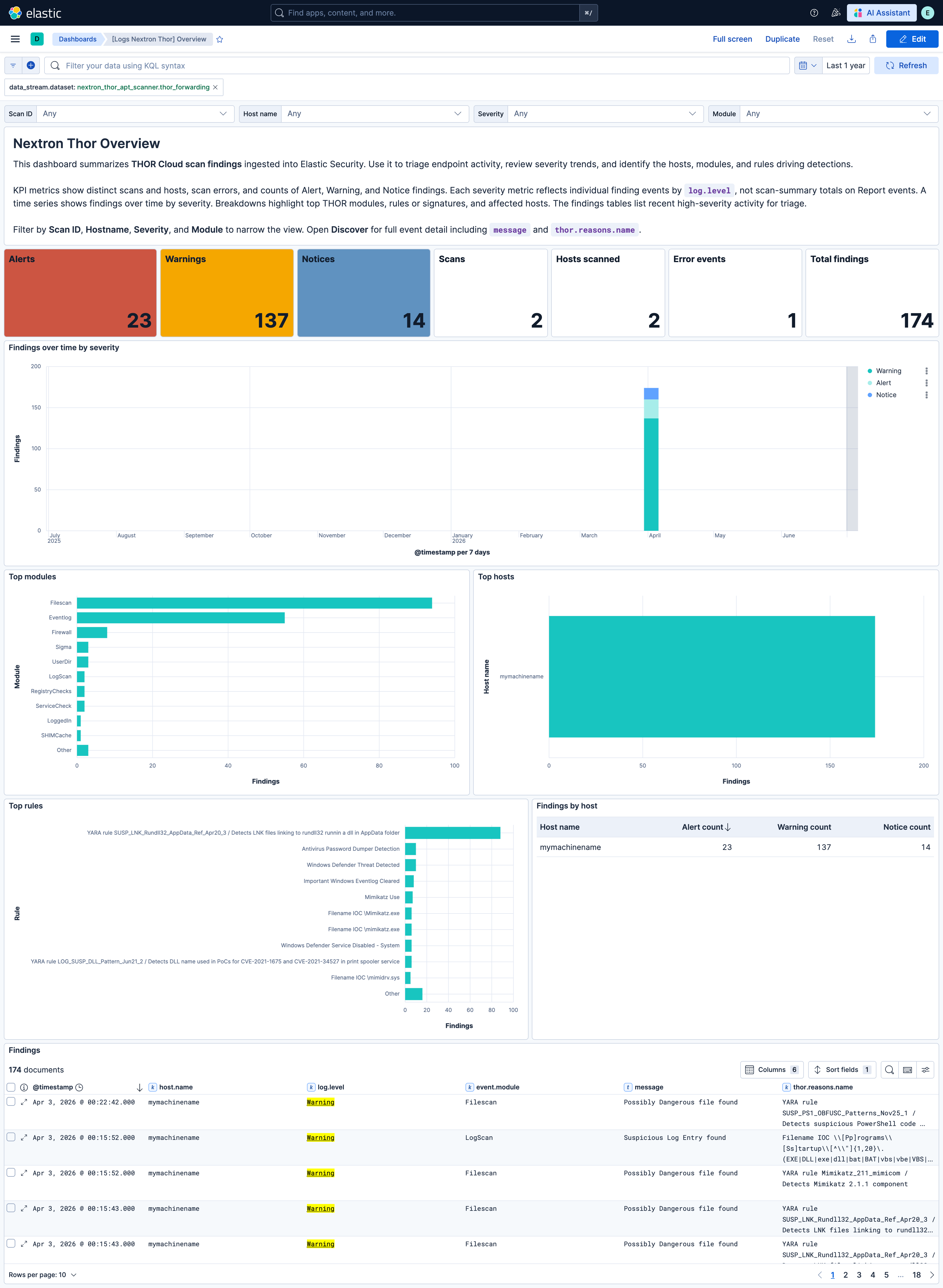
This integration includes one or more Kibana dashboards that visualizes the data collected by the integration. The screenshots below illustrate how the ingested data is displayed.

Changelog
| Version | Details | Minimum Kibana version |
|---|---|---|
| 0.5.0 | Enhancement (View pull request) Revise the integration overview for THOR Cloud accuracy, and document the encrypted report limitation. Enhancement (View pull request) Improve the overview dashboard for accuracy, coverage, and control. |
9.2.0 |
| 0.4.0 | Bug fix (View pull request) Fix CEL cursor advancement when scans produce no events, improve deduplication and file path parsing, handle AtJobs multi-value start timestamps, and terminate processing on API error responses. Enhancement (View pull request) Map event.category and event.type per THOR module, map process, registry, and rule fields to ECS, and set event.kind to alert for Alert-level findings. Breaking change (View pull request) Renames and retypes several thor.* fields and removes the default event.category: file; saved searches, dashboards, and detection rules that use the previous field names, keyword mappings, or blanket file category must be updated. |
9.2.0 |
| 0.3.0 | Enhancement (View pull request) Use new release field for agentless deployment mode to establish as beta. |
9.2.0 |
| 0.2.0 | Enhancement (View pull request) Enable Agentless deployment. |
9.2.0 |
| 0.1.0 | Enhancement (View pull request) Include campaign_id in logs to enable filtering and correlation by scan campaign. |
9.2.0 |
| 0.0.2 | Bug fix (View pull request) Fix file.name extraction from file.path for lowercase Windows drive-letter paths and root-level POSIX paths. |
9.2.0 |
| 0.0.1 | Enhancement (View pull request) Initial draft of the package |
9.2.0 |