

Database
The Database tab section contains the information of the SQL Server, the SQL credentials information, and the database name used by Devolutions Server.
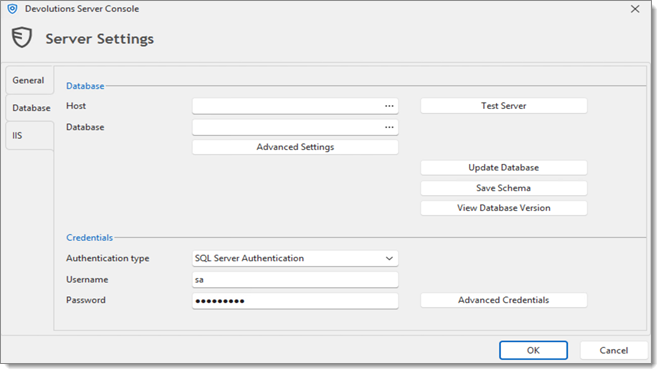
Settings
Database
Host
Name of the host where the database will be stored.
Database
Name of the database on the server.
Advanced Settings
Access the Advanced settings.
Test Server
Test the connection with the server to validate if the proper information has been provided.
Test Database
Test the connection with the database to validate if the proper information has been provided.
Update Database
Update the database on the server.
Save Schema
Save the database schema in a file to allow sending it to our customer support team.
View Database Version
View what is the current database version.
Credentials
Note that the Integrated Security or Credentials settings affect how the Devolutions Server communicates with the SQL database. These options do not have any impact on how users will authenticate on the Devolutions Server instance.
Authentication type
Select between Windows Authentication or SQL Server Authentication for authenticating to the database. For Windows Authentication to be used to connect to the database, you must set a domain account as the Application Pool identity in the IIS Manager.
Username
SQL login account username if SQL Authentication is selected as the authentication type.
Password
SQL login account password if SQL Authentication is selected as the authentication type.
Advanced Credentials
Access the Advanced Credentials that allows the Devolutions Server Console to communicate with the SQL database.
Last updated
Was this helpful?